Stacked pull requests
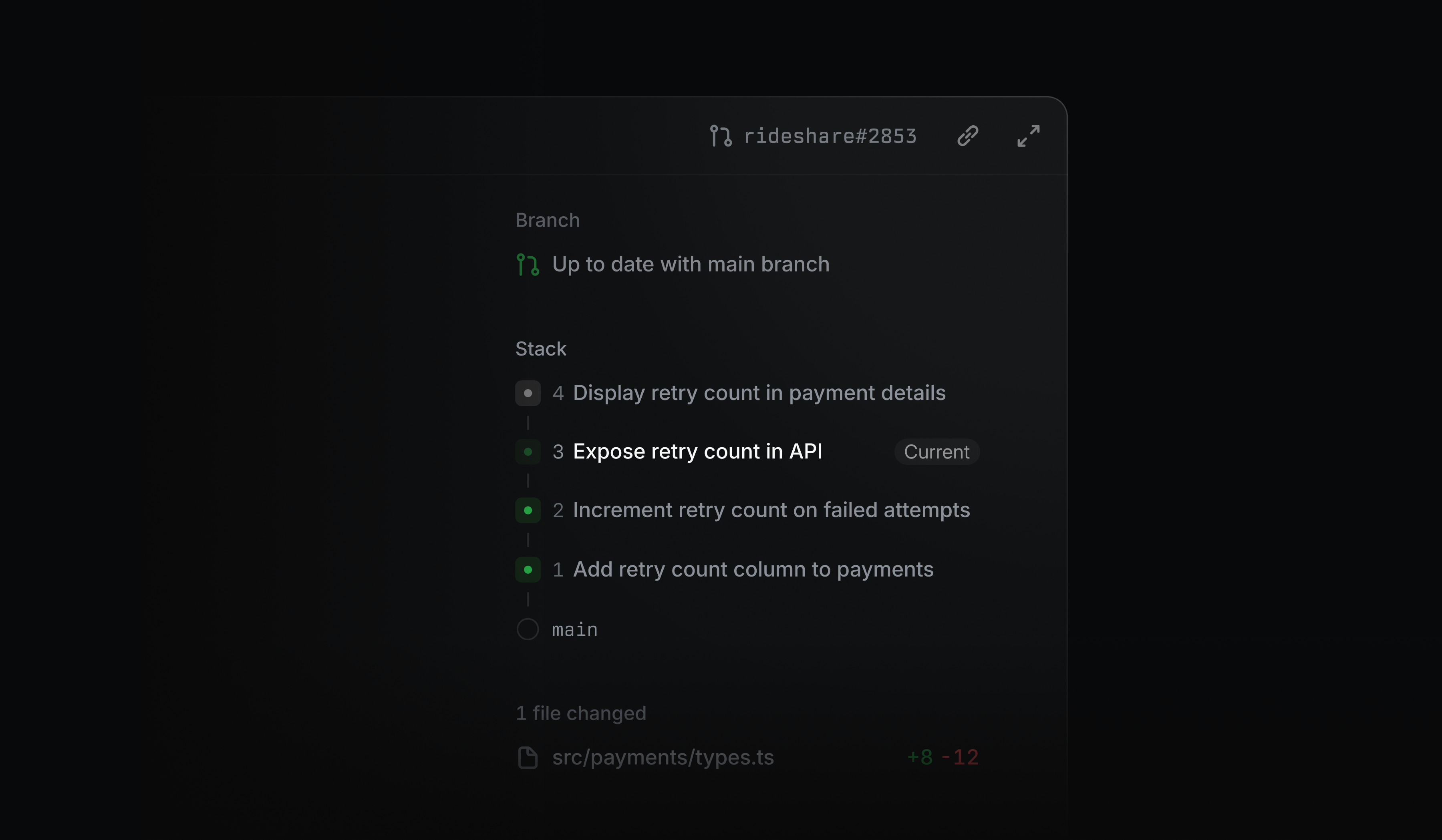
Stacked pull requests are now displayed in Linear Diffs. Move through a stack and see review, CI, and merge status at a glance. Related PRs are grouped into a single collapsible row in Reviews, alongside their issue and project context.
For GitHub-native stacks, you can preview every affected PR before merging the current PR and those below from Linear.
Learn more in our documentation.
View code changes as the agent works
Diffs now update in realtime throughout a Linear coding session, including uncommitted changes from follow-up prompts. You can follow the code as it evolves, catch wrong turns earlier, and steer the agent before or after a pull request is opened.
AI credit usage explorer and spend limits
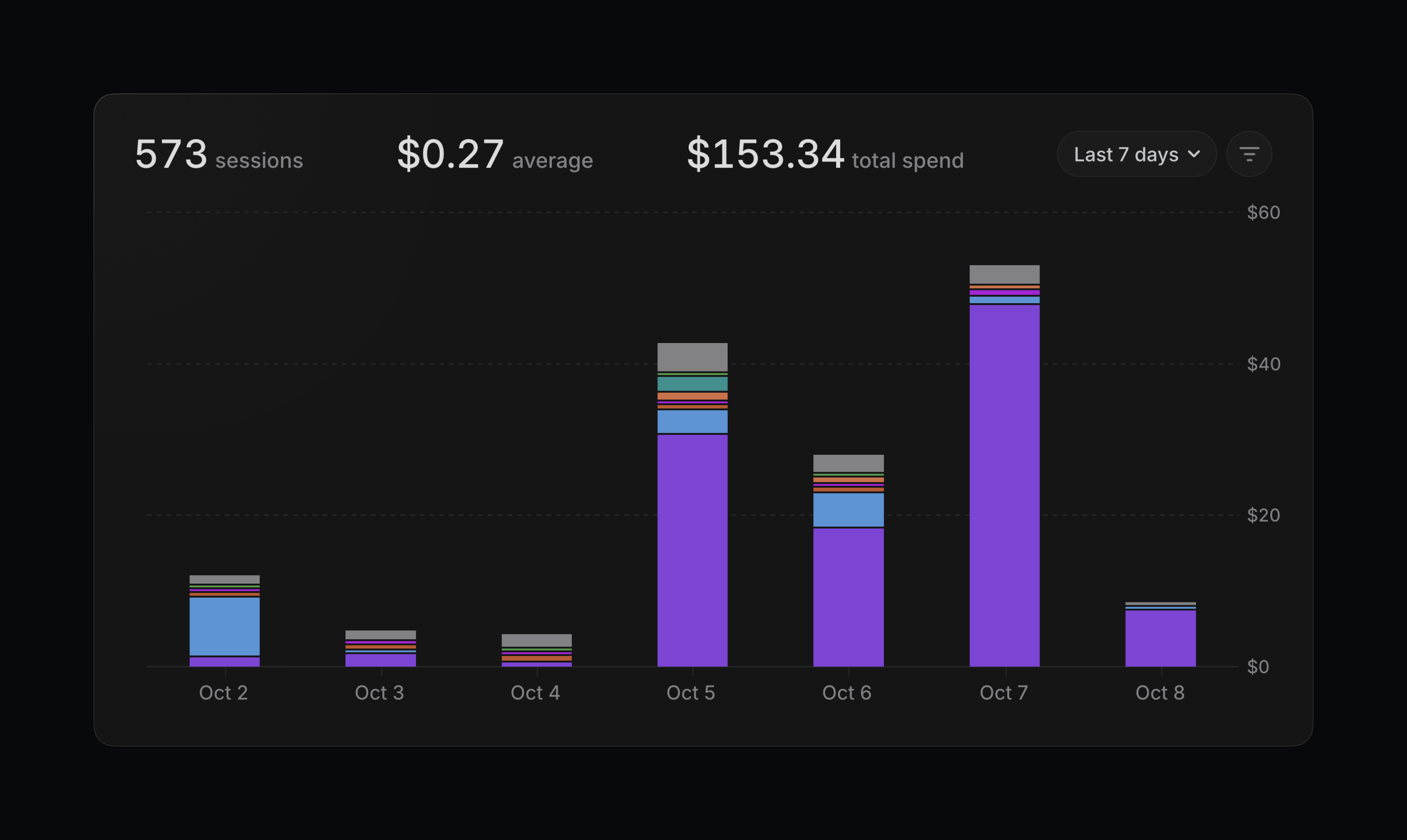
Admins can now see what’s driving AI credit usage and set limits to manage spend.
The new usage explorer breaks down spend by team, feature, user, or loop across any time period. Compare total spend, session count, and average spend per session, then select a group in the chart or table for a closer look.
You can also set spend limits at the workspace, user, or loop level to keep usage within the bounds you choose. When a limit is reached, additional AI credit usage is paused until the limit resets or an admin increases it.
Billing admins and owners can access both features in Usage & Limits. Learn more about AI credits in our documentation.
Guided Reviews on Basic
Guides walk you through the most important changes in a pull request. They’re now available on Basic plans.
- AsksFixed duplicate text in issue descriptions created from Slack messages
- DiffsStopped sending notifications for Codex reviews without inline code comments
- DiffsFixed review submissions failing when file review changes were still saving
- DiffsHidden running Codex review summaries and notified when reviews completed
- DiffsKept published review comments on unchanged lines current when edits shifted their position
- DiffsFixed closing search resetting the scroll position after opening a result in a collapsed file
- DiffsFixed approvals reverting during GitHub sync
- DiffsAdded confirmation before merging a pull request when you are not responsible for merging it
- EditorFixed document printing from intercepting macOS text navigation
- EditorFixed Backspace undo for automatically created mentions
- GitHubFixed repeated sync errors when a sub-issue was already attached to its intended GitHub parent
- ImportsFixed showing permission errors during Linear imports instead of leaving team selection loading
- InitiativesFixed the new initiative form appearing below the list instead of at the top
- IssuesFixed agent status badges not showing on unassigned delegated issues when the session needs attention
- OAuthReduced Cloudflare rate-limit errors caused by frequent OAuth token rotation
- ProjectsFixed Slack channel creation for agent-created projects with unformatted custom channel names
- ProjectsFixed duplicated project views resetting their display options
- SettingsHid sidebar integration warnings for users who cannot update the connection
- TriageTriage rules can only move issues to teams that the rule editor can access
- WebhooksFixed issue creation from Sentry alerts when payload values contain null characters
- ZapierFixed Zapier issue triggers now showing an error when the selected status belongs to a different team
- Coding SessionsImproved management capabilities for environment owners
- Coding SessionsAdded Claude Sonnet 5.5 as a coding session model
- DiffsAdded previous and next controls to jump between Guide sections without marking them reviewed
- DiffsAdded a merge confirmation in case there are failed non-required checks
- DocumentsAdded [[ to find or create documents inline, plus a “Create new document” slash command that attaches the document to the current context
- GitHubAdded coding-session static IPs to Linear’s published GitHub allowlist
- ImportsLinear-to-Linear imports now let you choose which workspace issue labels, project labels, initiative labels, templates, and project statuses to copy
- ImportsLinear-to-Linear imports can now include a parent team without some or all of its sub-teams
- IntegrationsGitHub issue priority is now a synced property
- IntegrationsAdded settings to update the GitLab token and enable automatic renewal (self-rotation of tokens)
- IOSImproved icon search to match multiple words across icon names, keywords, and categories
- IssuesAdded the option to save an issue copy as a draft
- OAuthRequired an explicit S256 method for PKCE authorization requests
- WebhooksAdded quotas limiting the number of webhooks per team (30) and per workspace (50)
- Customer RequestsAdded
list_customer_needstool that returns the customer requests for an issue, project, or initiative, one page at a time
- Added the ability to dismiss toasts using Cmd/CtrlOptX
New controls for Linear coding agent
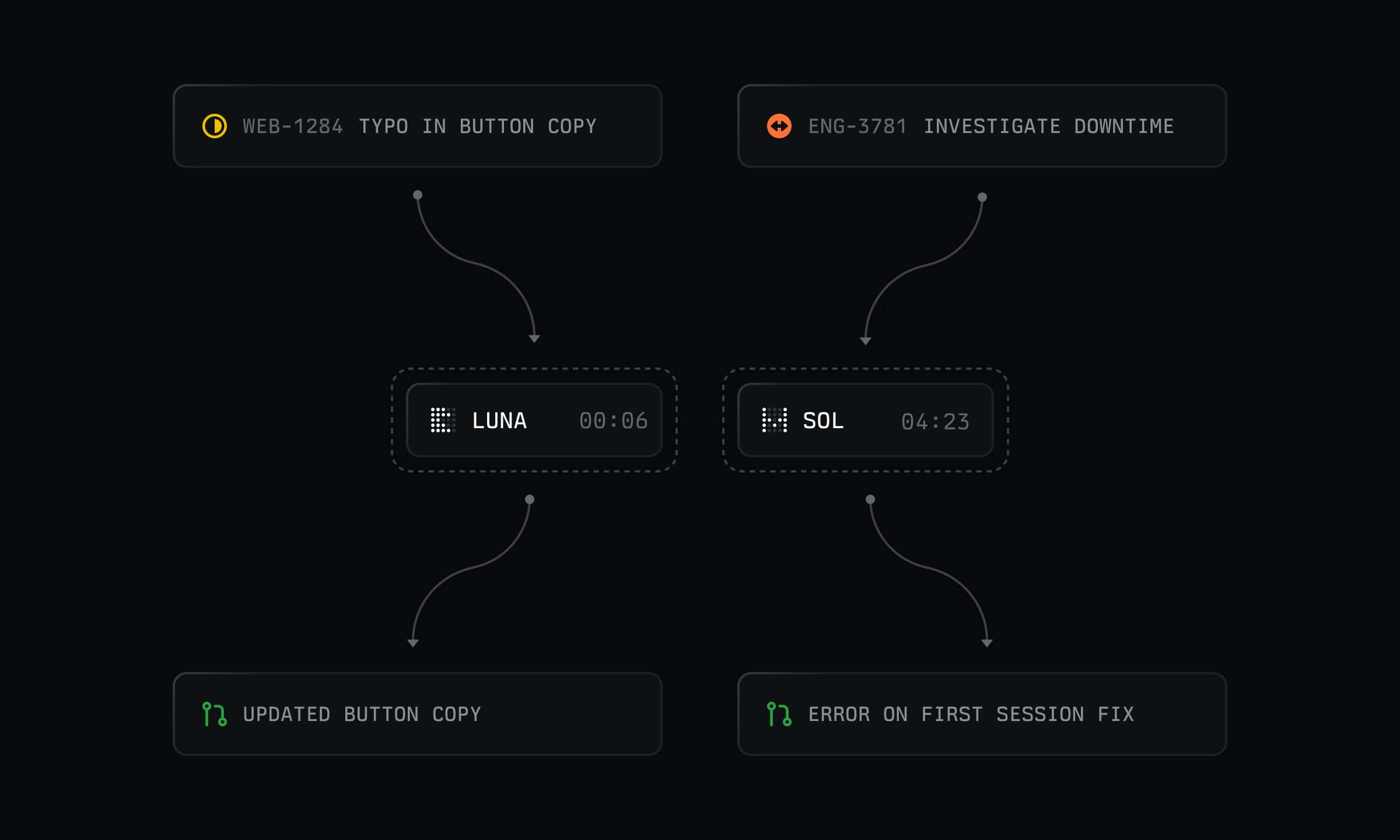
Coding sessions are the shortest path from issue to diff. Assign a task to Linear Agent, and it works in a secure cloud environment to write and test the code before opening a pull request for review.
We’re adding more control over how each session runs, from its environment to the models behind it.
Adaptive routing
Save time and tokens by automatically routing simpler tasks to a faster model while using the default reasoning model for more complex work. If a task needs more capability than expected, you can restart the session on the default model while keeping the original pull request for reference.
Environment secrets
Coding sessions can now access environment secrets during setup to securely fetch private dependencies and other environment config.
Open-weight models
Coding sessions now support open-weight models, starting with GLM-powered sessions. Workspace admins and owners can choose which models are available from Coding sessions settings.
Visit the docs for more details.
Team organization at scale
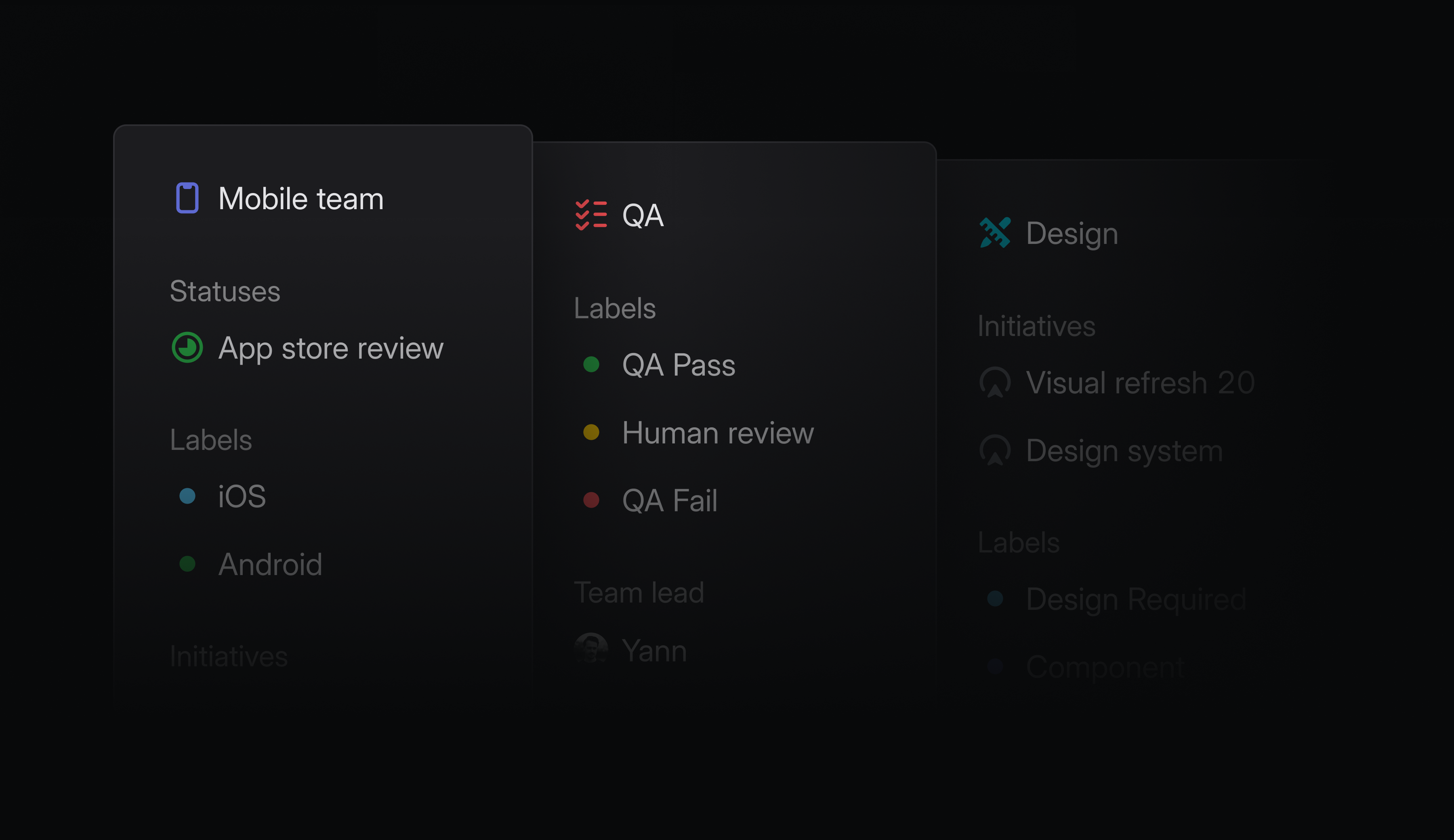
As companies grow, it can become challenging to accommodate every team’s workflow within a single workspace-wide system. A Product team may track discovery and development, while Marketing organizes work around campaign stages. Both need workflows that reflect how they operate, without fragmenting the company-wide view.
We’re giving teams more freedom to own and organize project work, without losing sight of the bigger picture.
Team project labels and statuses
Teams can now define their own project labels and statuses to reflect how they work, and extend those workflows across their sub-teams for consistency. Team project labels and statuses are available on Business and Enterprise plans.
Project lead teams
You can now define a lead team for a project to clarify ownership when multiple teams contribute. Filter by lead team to create focused views of the projects each team owns.
Team loops triggers
Loops can now run when a team is created, someone joins or leaves a team, or an issue is assigned to a team. This makes it possible to automate recurring coordination, such as sending onboarding information to new teammates or reassigning open issues when someone leaves.
Project and initiative IDs
Projects and initiatives now have durable, human-legible IDs. Reference work reliably in agent workflows and external tools, even when names change.
- AndroidFixed app crashes when a WebView renderer crashes or is stopped to free memory
- AsksFixed Asks sometimes duplicating Slack message content in descriptions
- DiffsFixed incorrect badge images in synced GitHub review content
- DiffsFixed stray markup appearing in synced GitHub content containing HTML entities
- DiffsFixed Codex review requests from GitHub appearing as threaded replies
- DiffsFixed auto-merge attempting to enter the merge queue before required checks complete when repository settings are stale
- DocumentsFixed unresolved document comments appearing resolved when created without a text selection
- EditorIncreased maximum zoom limit for lightbox images. Zooming past native dimensions now shows sharp pixel boundaries
- EditorFixed recent description edits sometimes being omitted when copying prompts, opening coding tools, sending AI messages, or importing meetings
- EditorFixed keyboard access and button semantics for editor node action menus
- EditorFixed holding Shift to preserve the aspect ratio when resizing an image crop
- EditorAdded support for Cmd/Ctrlscroll to zoom Mermaid diagrams
- ImportsFixed workspace migrations failing when custom views reference initiatives outside the selected teams
- InsightsFixed bar chart snapshots failing when state metadata is missing
- IOSFixed “No project,” “No milestone,” and “No agent” missing from matching picker search results
- LoopsFixed the search clear button not responding in the desktop app
- LoopsFixed Slack user group mentions rendering as literal text in Loop messages
- NotificationsFixed priority-only Slack notifications ignoring custom sender filters
- ProjectsFixed project descriptions being labeled as initiative descriptions for assistive technology
- PulseFixed Pulse disappearing and reappearing in the sidebar when opening the application
- SettingsFixed settings search ranking so pages appear above nested settings with equal matches
- SettingsFixed the allowed MCP connectors list to sort alphabetically by connector title
- SlackFixed Slack and Asks submissions restoring deselected template labels
- TeamsFixed guest member menus failing to open when the viewer could manage regular members but lacked permission to remove guests
- AgentLinear Agent can now contact support on your behalf
- AsksAdded the applied template name to issue creation activity
- DiffsAdded bot detection for GitHub usernames ending in
-botorBot - DiffsAdded syntax highlighting for
.cshtmland.razorfiles - DiffsSimplified Codex review comments
- DiffsGrouped closed diffs behind a count toggle in the issue sidebar
- DiffsAdded Android Vector XML previews and comparisons
- DiffsSimplified the activity wording when auto-merge is manually disabled
- DiffsAdded a saved option to switch between implementation and total line counts by clicking the review header stats
- DiffsAdded an option to show reviewer avatars in the Created list
- DocumentsImproved document printing to PDF with better page breaks, wide-table continuations, comments as linked endnotes, and consistent formatting for media and embeds
- EditorAdded an Insert screenshot option to the desktop slash menu on macOS
- EditorAdded support for pasting tab-separated data (TSV) as editable tables
- EditorAdded ShiftTab support to move nested collapsible blocks to the same level as their parent
- EditorAdded support for @-mentioning shared views pinned to team, project, and initiative pages in Linear agent chats and loops
- FiltersAdded Option/Altclick to replace the current filter selection
- ImportsAdded an option to create users outside selected teams as suspended during Linear workspace imports
- IntegrationsAdded the
updatesmagic word to create Contributes links from commits and pull requests - LoopsAdded support for running team and workspace loops on multiple selected issues from the command menu
- LoopsAdded Slack user group lookup so Loops can mention groups named in instructions or lookup tables
- OAuthAdded audit log entries for explicit OAuth token revocations
- SearchImproved document search using parent and folder names
- ViewsChanged the default nested sub-issue setting to show only issues matching the current filters
- ViewsImproved icon search with multi-word queries and category matching
- Mentioning a third-party agent in a comment now sends a follow-up to its most recent available session on that issue (working or completed)
- Added
FeatureandLineartags to Datadog feature flags created through Linear - Required pipeline administration rights to change release pipeline team associations
Loops for product management
Loops are recurring agent workflows for teams. They now respond to more workspace activity, including changes to initiatives, projects, and cycles. They can also edit Linear documents and post updates to Slack.
Teams change project plans all the time. It’s not the change itself that’s hard, but the follow-through: updating docs, creating issues, and keeping everyone informed. That’s where information falls out of sync and handoffs get missed. Loops can now handle that coordination for you.
For example, when a project’s target date changes, a loop can automatically update the launch plan and post a Slack message explaining what changed, why, and who needs to act.
Trigger from across your workspace
New triggers include:
- Project and initiative changes to status, ownership, target dates, milestones, membership, and labels, plus new updates and comments
- Cycles being created, started, or completed
- Issue changes to status, priority, assignee, cycle, project, or labels
Edit documents
In addition to creating issues and updating projects and initiatives, Loops can now edit documents. When scope or timing changes, a loop can update the relevant Linear document so plans stay aligned.
A loop can now also draft and post tailored Slack updates using context from Linear and connected tools. Keep the right people informed about what changed and what happens next.
Continue any run
Each loop run starts a conversation with Linear Agent. Once it finishes, you can continue that conversation like any other agent session to review the work, add context, or direct what happens next.
Loops credits available until end of year
We’ve extended introductory Loops credits through December 31, giving teams more time to test Loops on their own workflows. See the docs for more details.
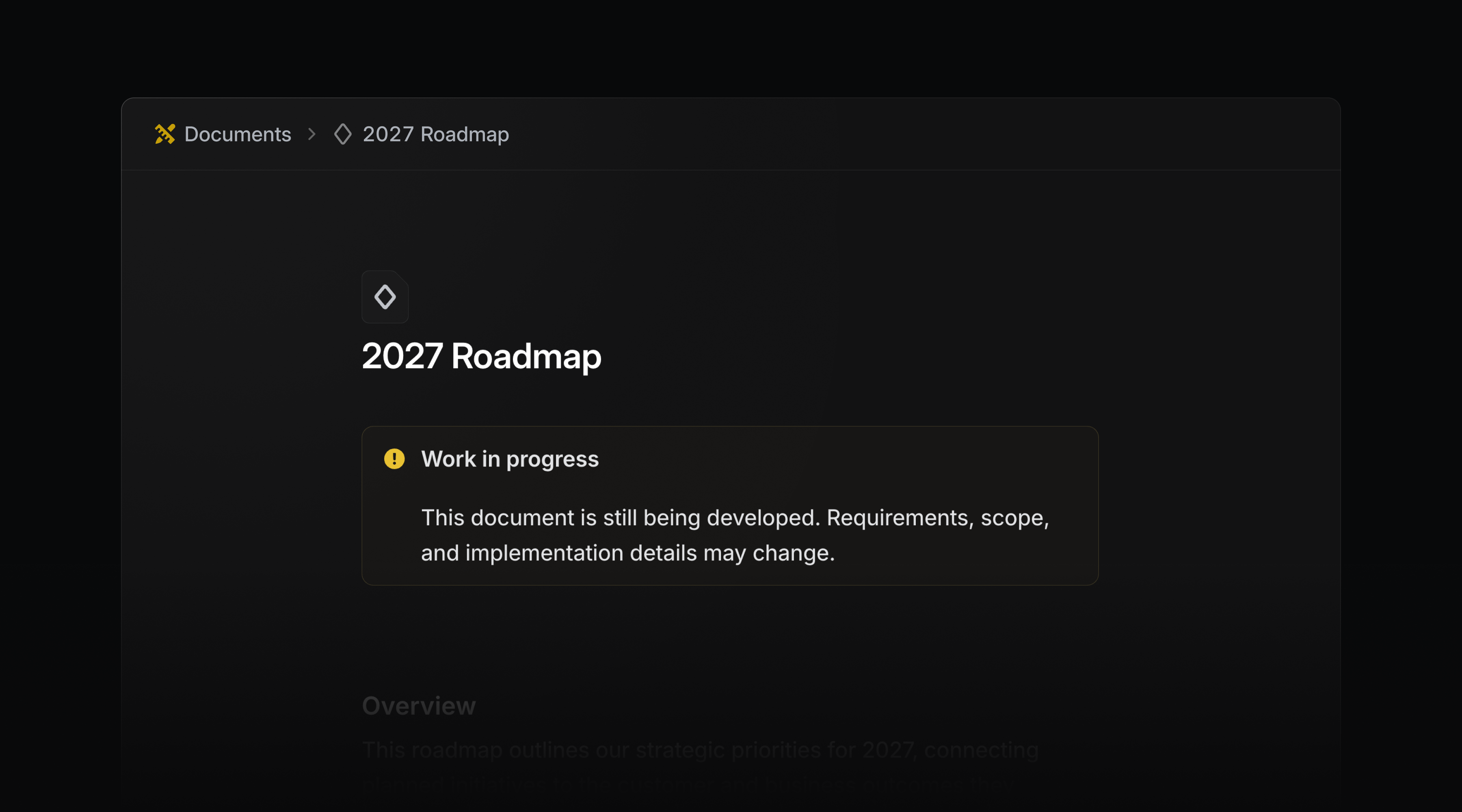
Callout components
Use callout components to draw attention to important information in issue and project descriptions, as well as documents. Choose any color, icon, or emoji to match the context.
In PR descriptions, Linear converts callouts to the closest matching GitHub callout type, so the emphasis carries over.
Type /callout to get started.
- DiffsReduced the number of false positives for issue suggestions
- ImportsPreserved archive status in GitHub imports
- IOSFixed issue list delegation confirmations showing internal user details instead of the agent’s name
- IssuesFixed issue copies omitting nested sub-issues
- MCPUpdated Datadog MCP connections to use the supported v1 endpoints
- SettingsFixed SCIM-managed team members incorrectly showing a Non-SCIM label to members and team owners
- SlackFixed a duplicate linkback when a message contained an issue identifier and a link to the same issue at the end of a sentence
- TemplatesIssues created from a form template now keep the status and labels of the board column they were created under
- DiffsAdded a “Copy filename” action to the file tree context menu
- DiffsAdded a hover explanation to the pull request status badge, so a “Blocked” badge states what is blocking the merge
- DiffsAdded Diff issue suggestion dismissal button
- DiffsAdded related diffs to the pull request sidebar
- EditorAdded support for commenting on links and viewing existing threads from the link toolbar
- FiltersChanged new label filters to default to “include any of” when all selected labels belong to the same group
- SearchIt is now possible to search projects by their synced Jira Epic key
- DiffsFixed collapsed-code controls so ShiftUp expands code above and ShiftDown expands code below
- Hid the Active MCP connections link when the user cannot access workspace security settings
list_teamsandget_teamnow report each team’svisibilityandretiredAt
- Added new outbound IPs for webhooks, which will go live in the next few weeks. Visit the docs for the current list
- Fixed team updates for Asks email intake addresses
Priority inbox
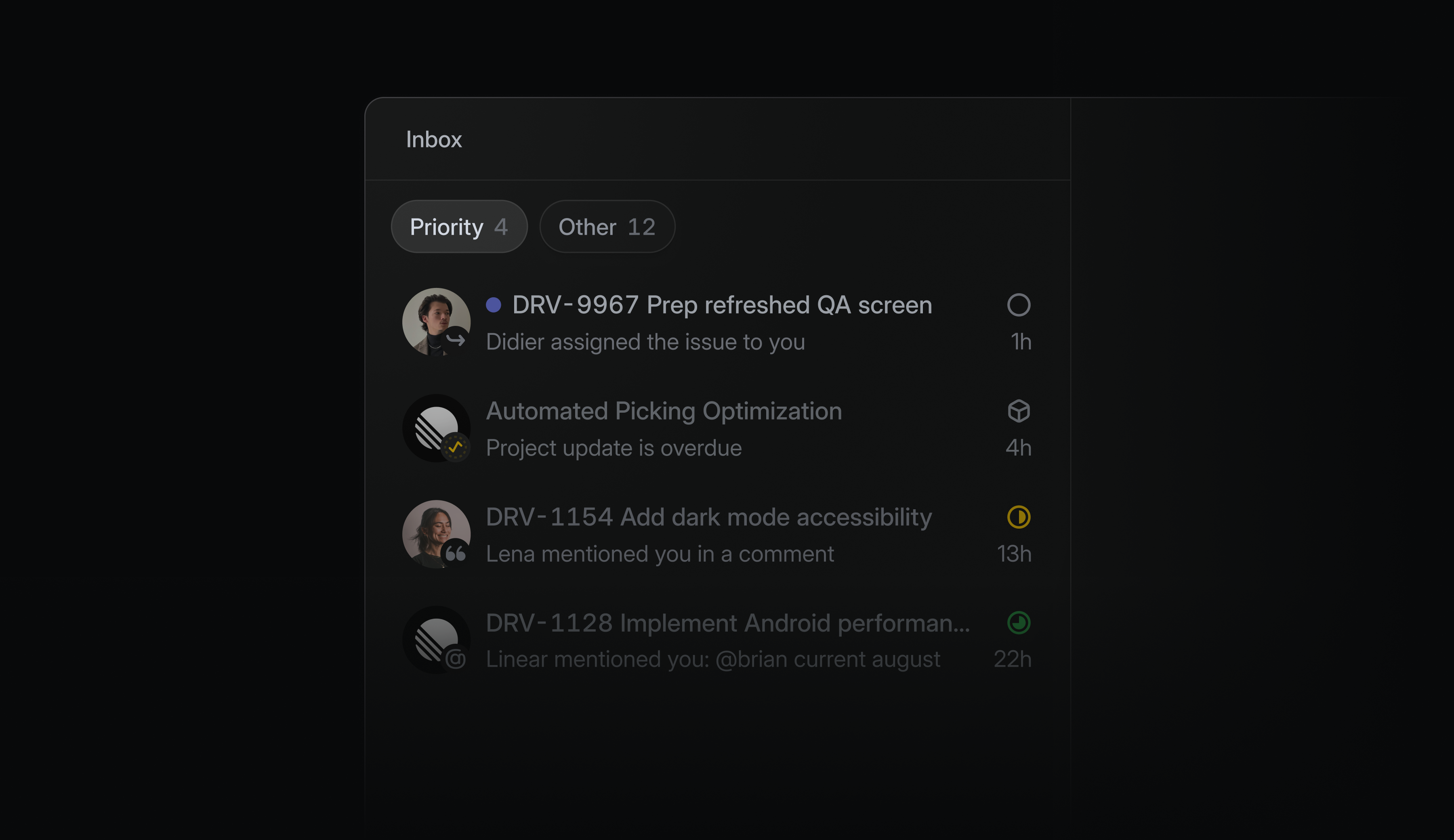
An active workspace can create a significant amount of notifications each day, and until now your inbox treated them all the same. The new Priority tab separates what needs your attention from what can wait, so something like a review blocking a release never gets buried.
Linear selects what appears in Priority by default, with the option to customize it by choosing notification sources or creating a filter. You can also continue using the inbox just as you do today.
To get started, open the inbox display options or read the docs.
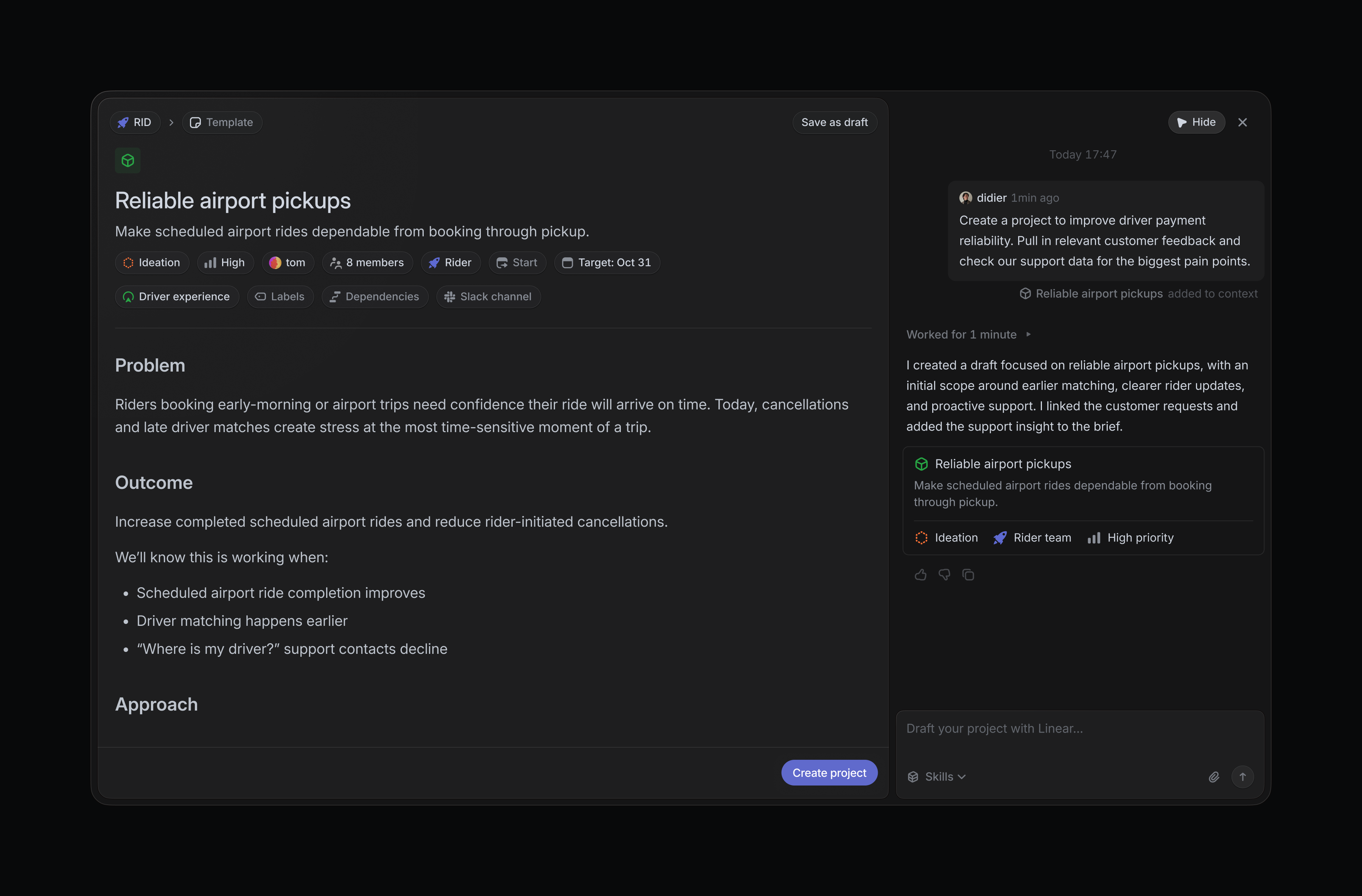
Draft projects with Linear Agent
The new project composer lets you develop ideas with Linear Agent before creating a live project. Inside the composer, Linear can pull in relevant context from your workspace and connected tools to sharpen the brief and build out a plan.
Drafts save automatically as you work, so you can return to the draft without losing progress.
Select Create with Agent in the project creation page to get started.
Document editing on mobile
Document creation and editing are now available in Linear’s iOS and Android apps. Start a doc while the context is fresh, update a plan as it changes, or fix a detail before it sends someone in the wrong direction, without waiting until you’re back at your desk.
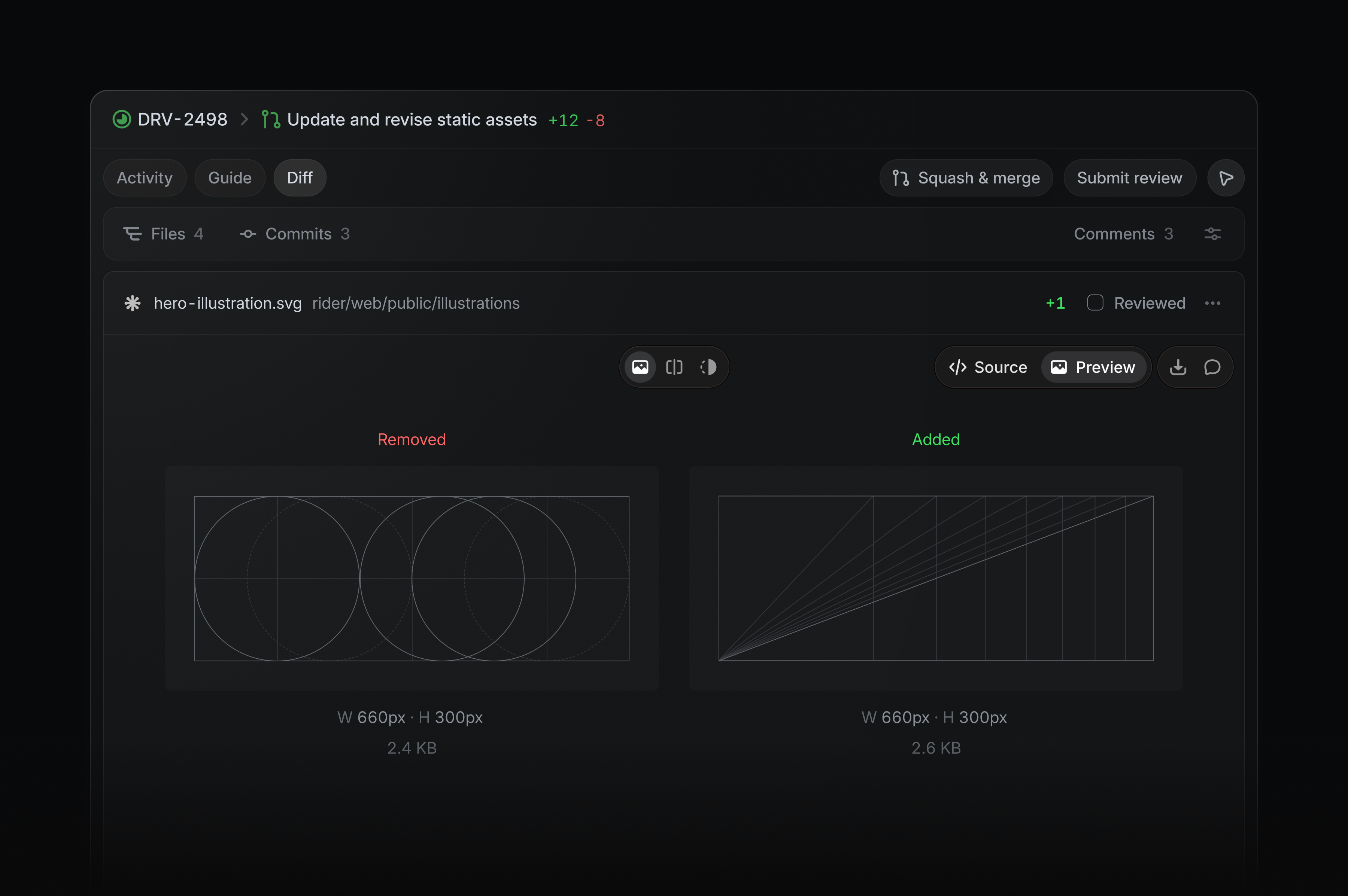
Rich previews in diffs
Images, fonts, Markdown, and PDFs now render directly inside Linear diffs. Reviewers can see the output alongside the code and understand what changed without leaving the pull request.
Symlinks are also now supported, shown as file-based changes.
Third-party app approvals
As more apps and agents connect to your workspace, admins need control over which ones can access company data. Third-party app approvals are now available on paid Linear plans, allowing admins to review and approve apps before they’re installed.
Learn more in the docs.
- AgentsFixed triage suggestions now showing the team name instead of the key
- AgentsFixed an issue where Linear Agent was sometimes not linking a PR to the issue it was generated from
- AsksFixed large inbound emails blocking workflow processing during quote detection
- DesktopFixed an issue where opening documents in the desktop app navigated to their parent
- DiffsReduced request spikes when opening very large pull requests
- DiffsFixed changed lines sometimes missing from pull requests
- DiffsFixed incremental PR Guide updates sometimes dropping unchanged sections
- IOS@-mentions now respect the full name display preference in comments and issue descriptions
- Linear AgentFixed agent panel “use as context” button’s tooltip incorrectly formatting entity names like pull request
- NotificationsFixed bulk notification actions to show both read-state options when the selection contains read and unread notifications
- ProjectsFixed the scroll position indicator jumping back to an earlier section while scrolling down a project overview
- SlackFixed issue creation failing after updating fields in the Slack issue form
- SlackFixed synced Slack replies being deleted when an issue is archived
- TeamsFixed team settings rejecting an unchanged team identifier that became reserved after it was initially claimed by the team
- TriageFixed cases where future shifts did not appear in triage responsibility when using an external schedule
- AccessibilityImproved accessibility of view display controls
- AsksAllowed reordering templates on Asks Web pages
- Command MenuImproved command menu to now use fuzzy search
- DesktopAdded native creation commands, including documents, and made Cmd/CtrlN choose what to create from the current view
- DiffsAdded compact activity updates for running and completed Codex reviews
- FavoritesYou can now add a loop to
Favorites - FavoritesYou can now right-click a favorites folder to copy the URLs of all items
- FavoritesYou can now drag items to add them to favorites
- FiltersAdded a “No labels” filter option
- FiltersAdded “My teams” filter value that matches the teams the current user belongs to
- LabelsRemoved the ability for labels to contain emojis
- Linear AgentFiles dropped anywhere over an Agent chat now attach to the message composer
- LoopsNotified loop owners when one of their loops is deleted or disabled by someone else
- LoopsAdded support for running scheduled Loops every hour or at custom hourly intervals
- SettingsAdded an option to start SLA timing when an issue is created instead of when it is escalated
- SettingsAdded CSV exports to workspace teams, team members, API keys, and usage history tables
- SettingsAdded support for adding multiple workspace members to one or more teams at once
- SettingsAdded support for selecting workspace members and changing roles, suspending, or activating them in bulk
- SlackAccents in Slack always use the color defined for the associated issue status
- TeamsAdded bulk member selection, team owner promotion, demotion, and removal to team member settings
- WorkspacesStandardized search, filter, and display controls across workspace-level Teams, Members, Loops, and Releases views
- Fixed ShiftCmd/CtrlO opening sub-issue creation instead of the pull request preview
- Added O then G to open linked pull requests and synced GitHub issues from issue views
- Added the
startModefield andSLAStartModeenum to SLA configuration responses - Added outbound IP addresses published at https://linear.app/.well-known/appspecific/app.linear.ips.json
Coding sessions: environments, browser use, and updated pricing
Linear Agent can now set up, run, and test your code before returning its work. That means fewer handoffs and changes that are further along when they come back to you.
We’re also introducing lower, more transparent pricing, making AI credit usage easier to understand and control.
Configurable environments
Coding sessions now automatically adapt to each codebase’s configuration, with broader out-of-the-box support for Python, Ruby, Go, and more.
During a session, Linear detects and installs the toolchains and dependencies it needs to complete the task. Teams can go further by pinning runtime versions, adding setup scripts, and defining environment variables.
To get started, create an environment in settings. Visit the docs for more details.
Browser testing
Once the application is running, Linear Agent tests its work where users experience it: in the browser.
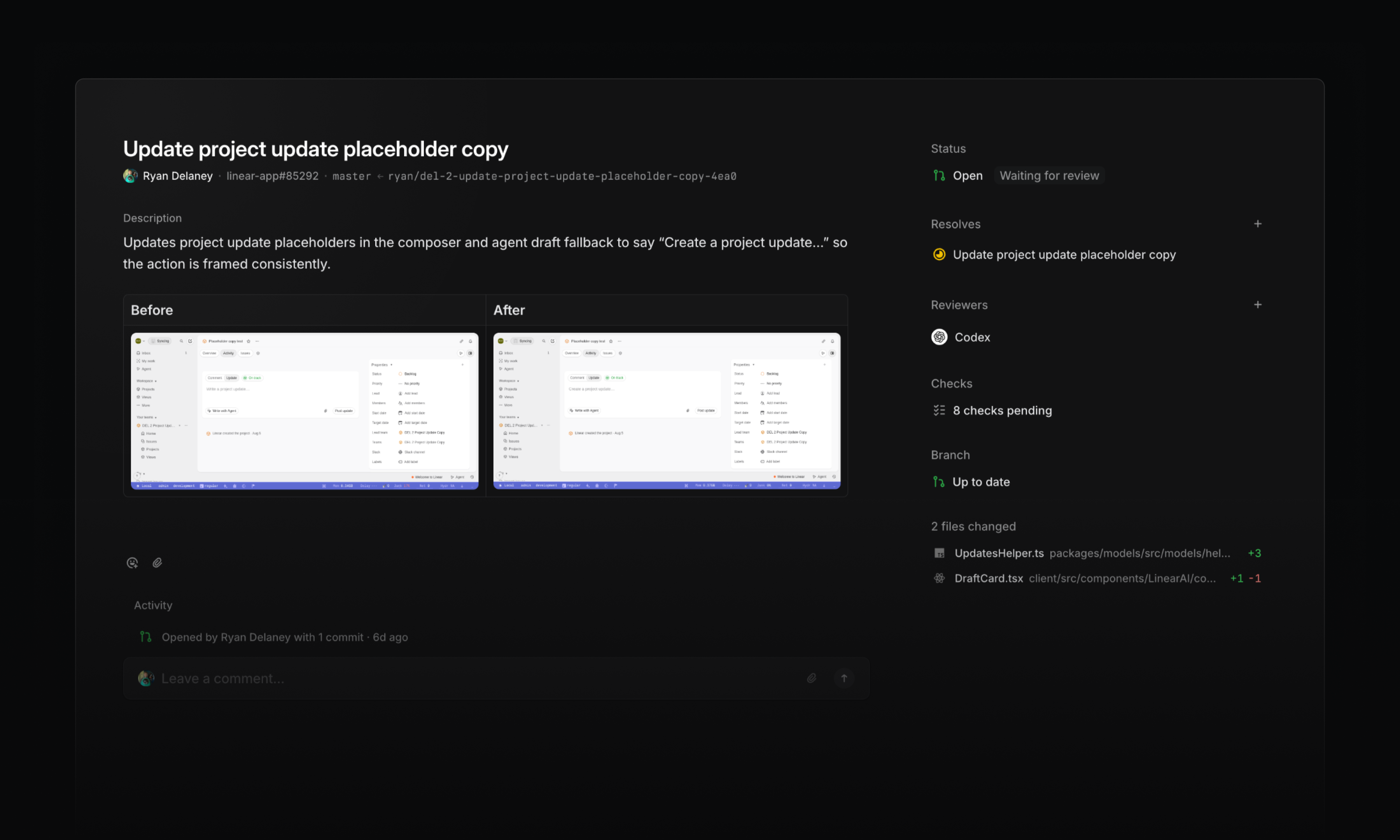
The agent opens the app, navigates through a flow, and verifies its implementation. It also captures before-and-after screenshots, making visual changes easier to review alongside the code.
Browser testing can catch broken interactions and visual regressions that code review alone might miss. If the agent finds a problem, it can make a fix, rerun the test, and return the work with that validation complete.
Transparent pricing
As coding sessions take on more work, costs need to be easy to understand and easy to control.
Starting today, coding sessions use a lower-cost pricing model with two components:
- Model usage: Tokens are charged at the provider’s published rates, with no markup
- Sandbox runtime: Charged at $0.25 per 20-minute block
Together, model usage and runtime determine the AI credit cost of a session. The usage dashboard shows the breakdown, along with token usage and cost by model.
Admins can also set workspace-wide and per-user spend limits that reset daily, weekly, or monthly. When a limit is reached, additional AI credit usage is paused until the limit resets or an admin increases it.
Learn more about AI credits in the docs.
- AgentsFixed an issue where Linear couldn’t find or assign a future cycle when referenced by its number (e.g. “Cycle 13”) in Slack and comments
- AndroidFixed read AI conversations appearing bold in the conversation picker
- DesktopFixed search and create issue buttons in the sidebar not responding to clicks at narrow window sizes
- DiffsFixed merge queue duration tooltips appearing stuck
- DiffsFixed guide sections with a lot of files in them not being scrollable
- DiffsFixed Linear guest users with a connected GitHub account being able to edit Diff title and description if they have write access to that PR on GitHub
- DiffsRemoved hover underlines from GitHub code embed header links, kept their link cursors when focused, and added external-link indicators to file names
- DiffsFixed repeated review cache errors when IndexedDB is unavailable
- AsksAdded a per-channel Asks setting that posts a message mentioning the new assignee in the synced Slack thread when an Ask is assigned
- AuthenticationImproved pending SAML domain verification from 24 hours to seven days
- DiffsImproved meaningful change count on PR tooltips as well
- IOSImproved error messages for unsupported media formats
- IssuesAdded the full issue copy menu to the issue header URL button
- Team HomeInitiative documents pinned to a team’s overview now also appear in the team’s documents tab
- ViewsAdded ability to subscribe to events in project views and receive notifications in Inbox or Slack
- IssuesOpen a GitHub-synced issue in GitHub with OG
- IssuesFixed Cmd/CtrlUp/Down scrolling to the top or bottom of an issue after editing its title or description
Team initiatives
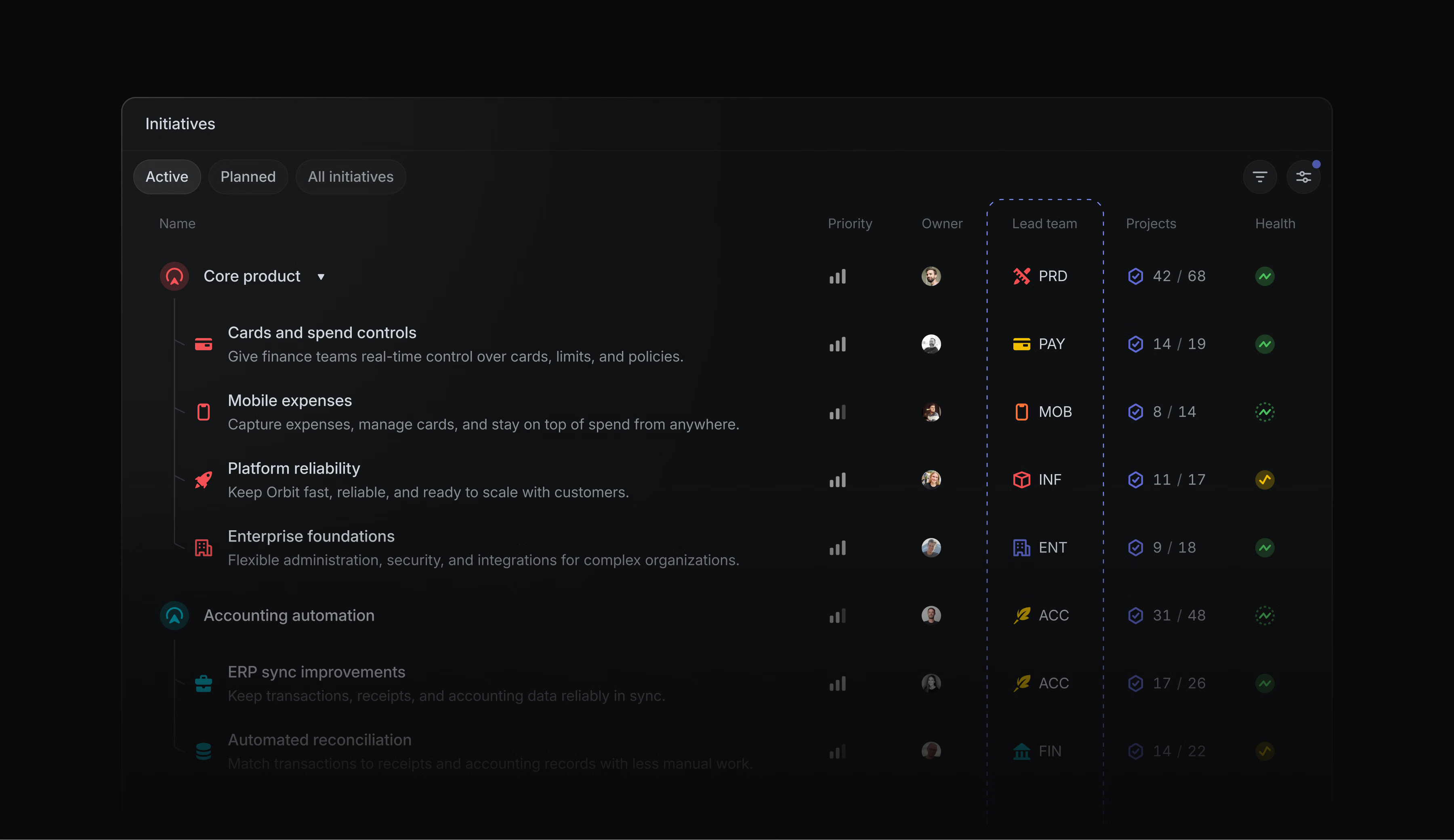
Initiatives are Linear’s way to manage product strategy and high-level planning across projects. Strategy may start at the company level, but teams carry it forward. You can now assign a team to lead an initiative, making it clear who is responsible for driving the work and how it contributes to the broader direction.
For work that requires tighter access, initiatives led by private teams are only visible to team members. This creates a secure place for confidential planning, regulated projects, audits, and other restricted work.
Learn more about initiatives in the docs.
Linear’s MCP now supports managing employee access through your existing Okta-managed identity.
When employees connect from a supported Anthropic agent, Linear verifies their identity through Okta and applies their existing Linear permissions. Admins can manage access centrally, without requiring employees to sign in or authorize Linear individually.
Available to Enterprise workspaces with Okta SAML configured. Learn more in the docs.
- AgentFixed agent sometimes not showing a progress indicator
- AgentFixed Linear Agent sometimes claiming a Slack thread synced when it did not
- CommentsPrevented document comment threads from shifting away from their referenced text when content changes size
- CyclesFixed new cycle names with quarter or half-year labels not incrementing correctly
- CyclesFixed fast issue creation while viewing completed cycles
- DiffsFixed code review discussions crashing when a file path is missing
- DiffsFixed comment links not opening the associated thread
- DiffsFixed authored pull requests appearing in “To review” after commenting
- DiffsFixed closing an already-closed GitHub pull request failing to remove it from review lists
- DiffsFixed stale PR Guides not refreshing after a pull request update
- EditorAdded support for comments on Mermaid diagrams
- GitHubFixed closing an abandoned draft pull request changing the status of an issue already marked Done or Canceled
- GitLabFixed merge requests from deleted users failing to process
- IntegrationsFixed disconnecting a personal Notion account opening Notion instead of removing the connection
- IntegrationsRenaming an OAuth application now updates the name shown in the activity of issues it creates
- IssuesFixed imported recurring issues missing their recurring-series link in issue history
- IssuesFixed drag-and-drop for sub-issues in views sorted by status, title, or due date
- IssuesFixed “Copy as” prompt copying a parent issue instead of the selected sub-issue
- NotificationsFixed duplicate notifications for GitHub review requests
- NotificationsFixed members being unable to disable Slack alerts for shared custom views
- ProjectsFixed blocking and blocked-by relationships appearing in the wrong direction in project activity
- ProjectsFixed project and initiative update reminders being sent when an update was already posted on the previous business day
- SearchImproved exact user name matches in search results
- TriageAdded GitHub usernames to GitHub-sourced issues in triage
- AgentLinear Agent can now update releases
- BillingAdded the ability to remove a previously set tax ID
- Coding sessionsAdded GPT-5.6 Luna as a model option
- CyclesAdded an explanation of cycle success to the tooltip
- DiffsAdded a branch-status widget showing whether a branch is up to date, behind, or has conflicts
- DiffsGrouped agent and bot review comments under Agents & Bots
- DiffsMade structural diff highlighting the default
- DiffsShowed merge-queue time on pull request hover
- EditorAdded support for mentioning pull requests from the editor mention picker
- EditorPressing Enter at the end of an issue or document title now starts a new line at the top of the content below it
- GitUpdated
relates toandrelated tomagic words to mark pull requests as related rather than contributing - ImporterAdded an option to skip workspace-level labels and templates during Linear-to-Linear imports
- IntegrationsImproved the channel connection labels across Slack and Microsoft Teams menus
- IOSWe now indicate progress while importing photo library attachments for comments
- LoopsMade the Disabled badge interactive so loops can be re-enabled directly
- ProjectsAdded project milestone agent widgets on iOS
- Added
subscribersfield onDocument - Added a subscription for user settings updates
- TeamsFixed CtrlShift1–9 shortcuts for opening team home pages
Coding sessions on mobile
Your coding session doesn’t have to stop when you leave your desk. Use the Linear mobile app to review code changes, comment on specific lines, and iterate with Linear Agent.
Open any diff and switch to the Changes tab to inspect the code. When you spot something to change, tap the relevant line to add it to your message to steer the coding session in the direction you want.
We’ve also added section under My Issues → Assigned for your delegated issues. It shows the status of each coding session, and gives you a quick way back into active work.
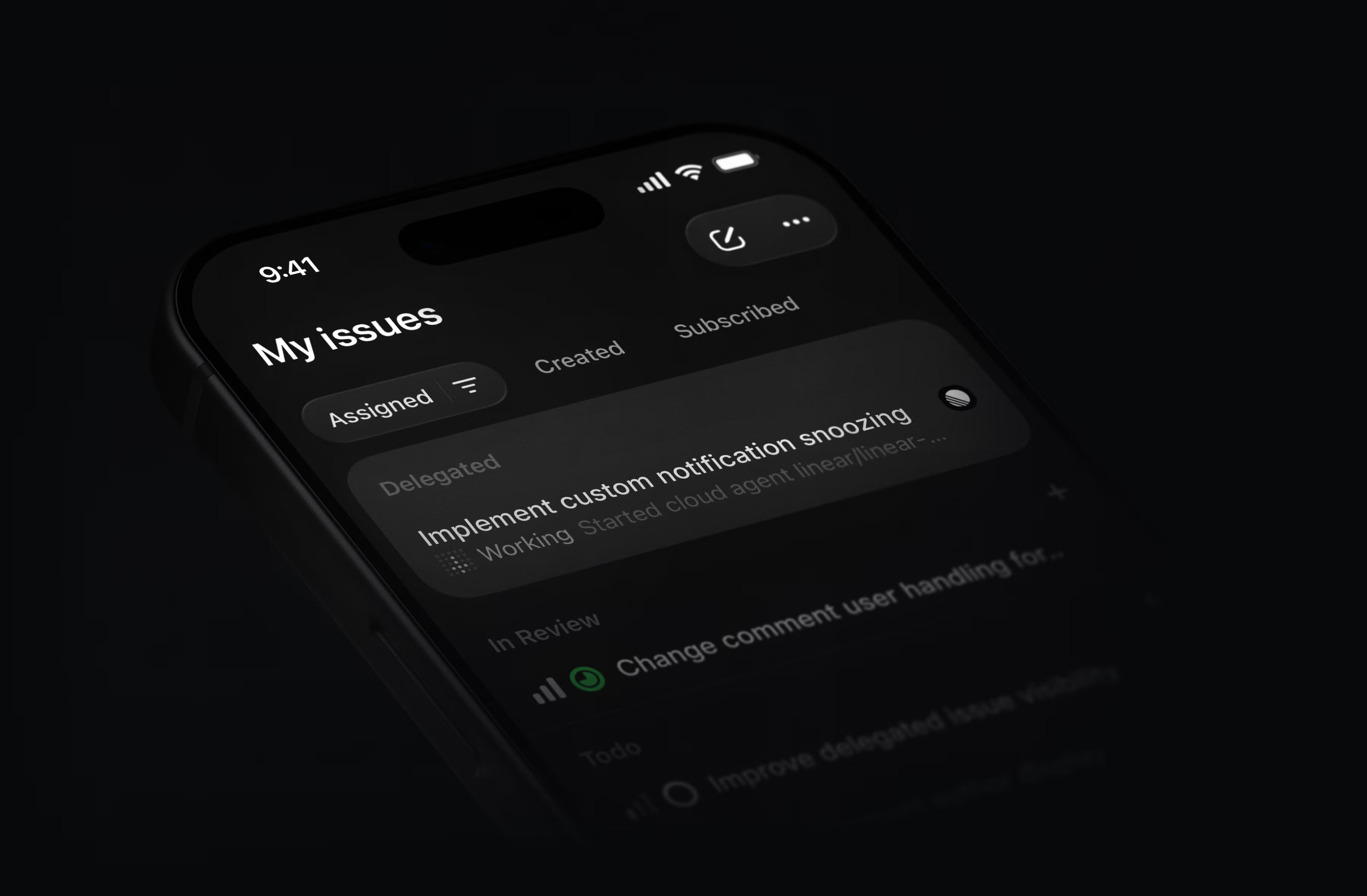
Download the Linear mobile app for iOS and Android.
Guided Reviews are now generally available
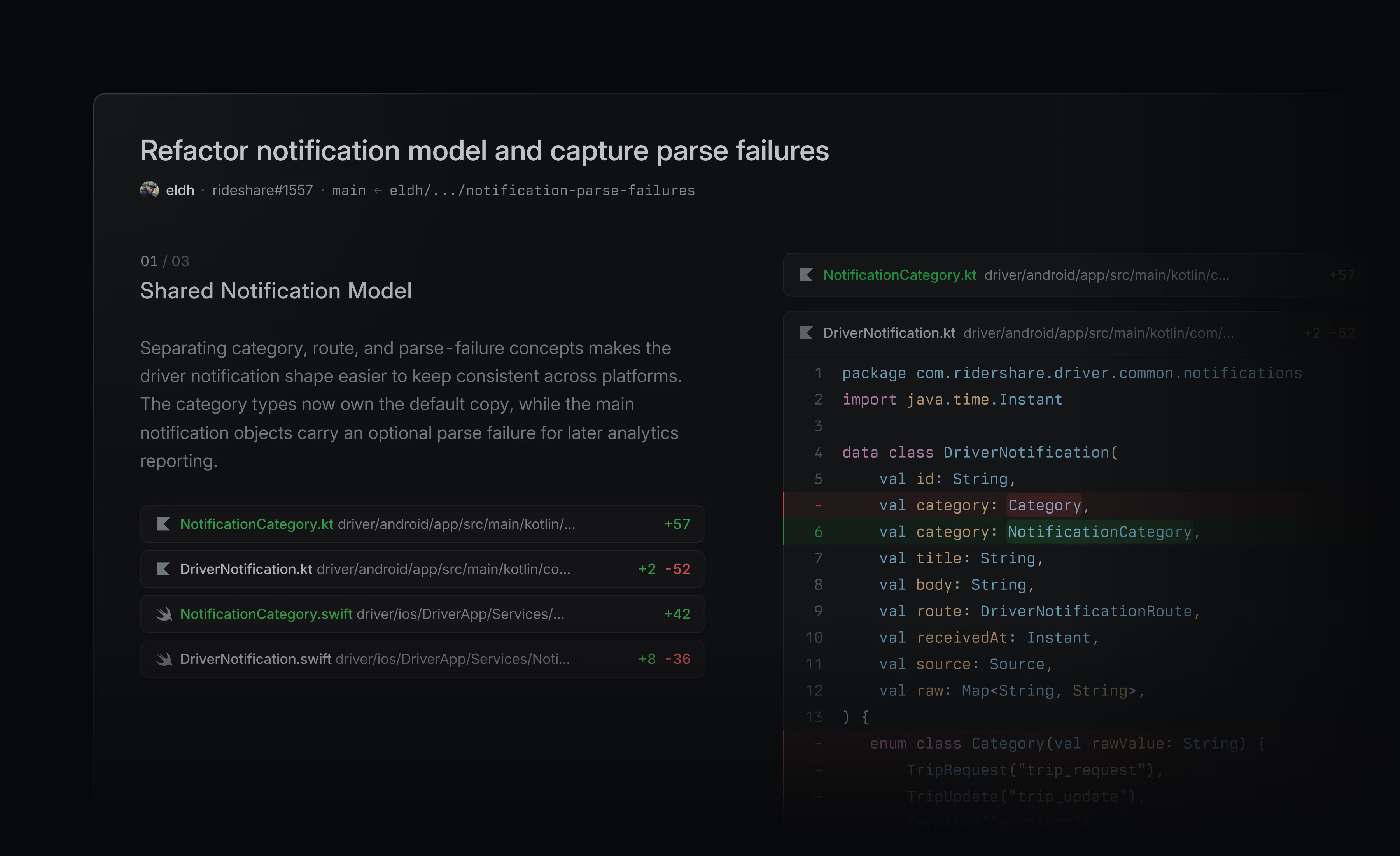
Guided Reviews break diffs into focused sections with explainers on what changed and why. As part of general availability, they are now generated for larger pull requests, with a bigger context window and better latency.
Guided Reviews are available on Business and Enterprise plans at no additional cost.
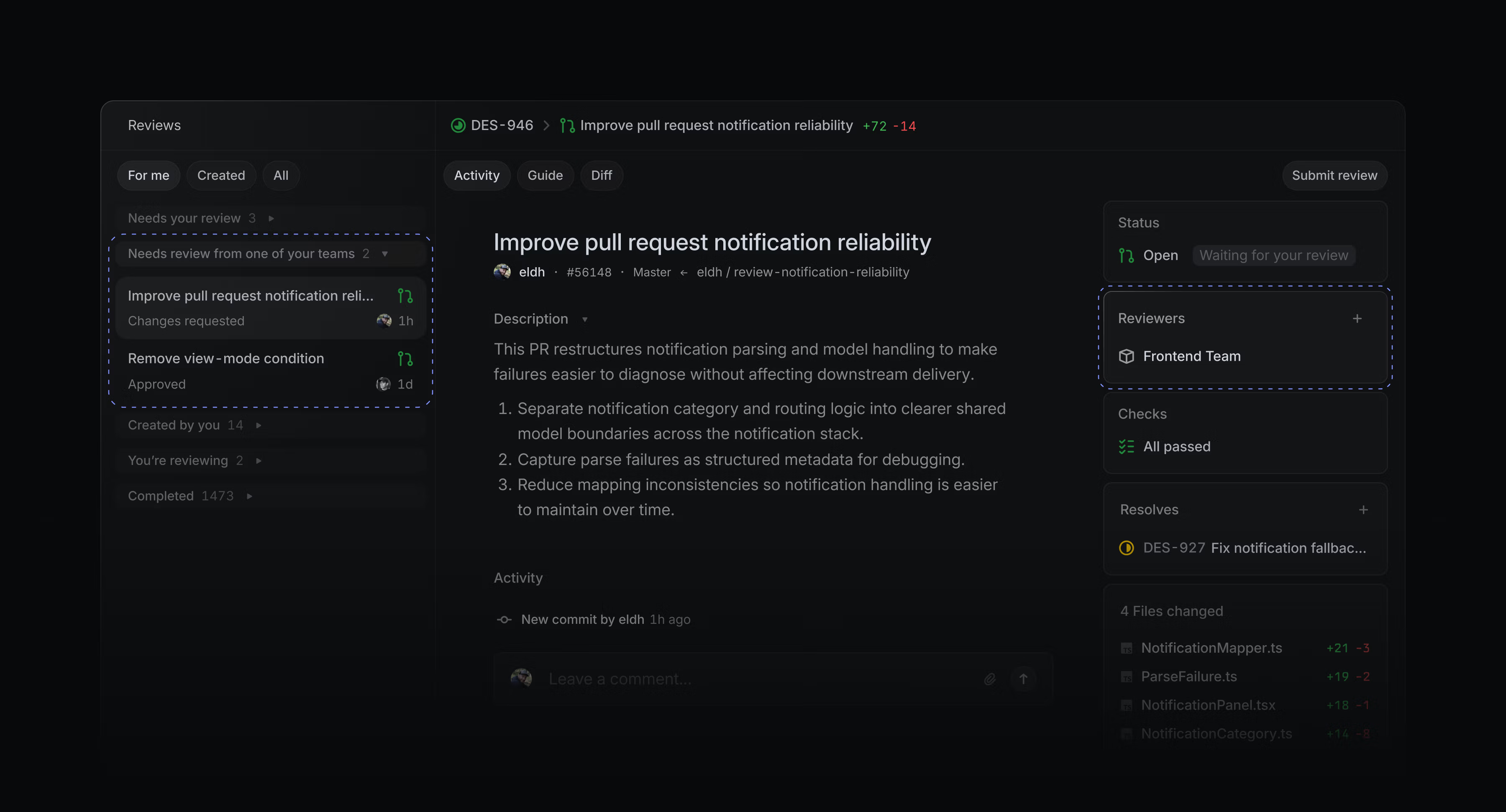
Support for GitHub teams in reviews
You can now assign reviews to GitHub teams. Review requests assigned to your GitHub teams appear in a dedicated section of the Reviews inbox. Learn more in the docs.
Signed commits for coding sessions
Coding sessions now support signed commits. Add your SSH or GPG key in Settings to enable signing.
Workspace admins can also require users to upload a signing key before using coding sessions.
GitHub Copilot for Linear
GitHub Copilot users can assign issues directly to Copilot’s cloud agent from Linear. Copilot uses the issue context to work in its own development environment, open draft pull requests, and update the issue as it makes progress.
Choose model and agent settings, set the base and working branches, then steer ongoing work through comments in Linear. To get started, install GitHub Copilot for Linear, or read the GitHub announcement for more details.
- AgentsQueued agent messages now display readable text in previews instead of raw markup
- APIFixed issue SLA sort to order by the displayed SLA bucket (Breached / High / Medium / Low / Achieved / Failed) instead of raw
slaBreachesAt, so mobile lists no longer show repeated SLA sections - CommentsInline images no longer appear too large in iOS comments
- DiffsPull request reviews no longer unexpectedly open an inline comment draft when the revision changes
- DiffsDismissed issue suggestions no longer reappear on pull requests
- GitHubPull request events now update issue statuses when a Git automation branch pattern contains unsupported regex syntax
- InboxFixed new project and initiative update notifications appearing as separate inbox entries for the same parent
- IntegrationsGitHub Enterprise Server setup no longer gets stuck on “Verifying installation” after the Linear app is created
- IntegrationsPrevented Slack Asks from responding to unmentioned thread messages after creating an Ask
- IOSFile, image, and video attachments in document comments now open when tapped, and attachment cards have better contrast in the comments drawer
- IssuesIssue boards now show an error instead of an empty state when too many issues match
- ReviewsStructural diffs no longer mark entire reformatted statements as changed when only part of the statement changed
- ReviewsResolving a review thread that no longer exists in GitHub now shows a clear message instead of a generic error
- SearchSearching for a GitHub URL now finds issues that reference the pull request
- SlackFixed Slack review request notifications sometimes showing the wrong person as the requester
- SlackFixed pasting a project milestone link into Slack now previewing that milestone instead of another milestone from the same project
- TeamsFixed internal custom view and dashboard links in Team Home displaying generic labels or icons
- Triage“Copy as prompt” no longer moves issues out of triage
- DiffsDiffs linked as
Relatedno longer change the status of the issue - DiffsAI can now generate a Linear issue from a pull request or suggest an existing issue to link
- DiffsInline feedback can now be sent to the Linear Agent, added to a review, or posted to the diff
- DiffsNew agent sessions can now be started from any pull request using the Agent panel
- DiffsTypeScript and JavaScript regular expressions can now be tested directly from the file where they’re introduced
- DiffsPull requests now show the number of meaningful changes, excluding tests and documentation
- DiffsImproved Slack notifications for a pull request removed from the merge queue to include the reason it was removed
- EditorUpdated the keyboard shortcut cheat sheet to show Cmd/CtrlEnter for toggling checklist items
- ImportersIt is now possible to import issues into a sub-team if it doesn’t inherit statuses from its parent team
- IssuesYou can now restore an archived or deleted issue from the iOS app
- LoopsImproved the “Authenticated email intake” trusted source by renaming it to “Email intake” and explaining when an email is treated as trusted
- LoopsAdded ability for Loops to send user notification
- ZendeskImproved the Zendesk integration to allow connection using an agent role instead of an end-user role
- Added Zapier to the built-in MCP connector directory
- EditorToggle a checklist item with Cmd/CtrlEnter when the cursor is inside it. Hold Shift to also toggle nested items
- SearchEscape now clears the search input while keeping the current results, then dismisses search when the input is empty
- TriageTriage keyboard shortcuts now follow the order of the actions:
1accepts,2declines,3marks as duplicate
Text attribution and agent-assisted editing
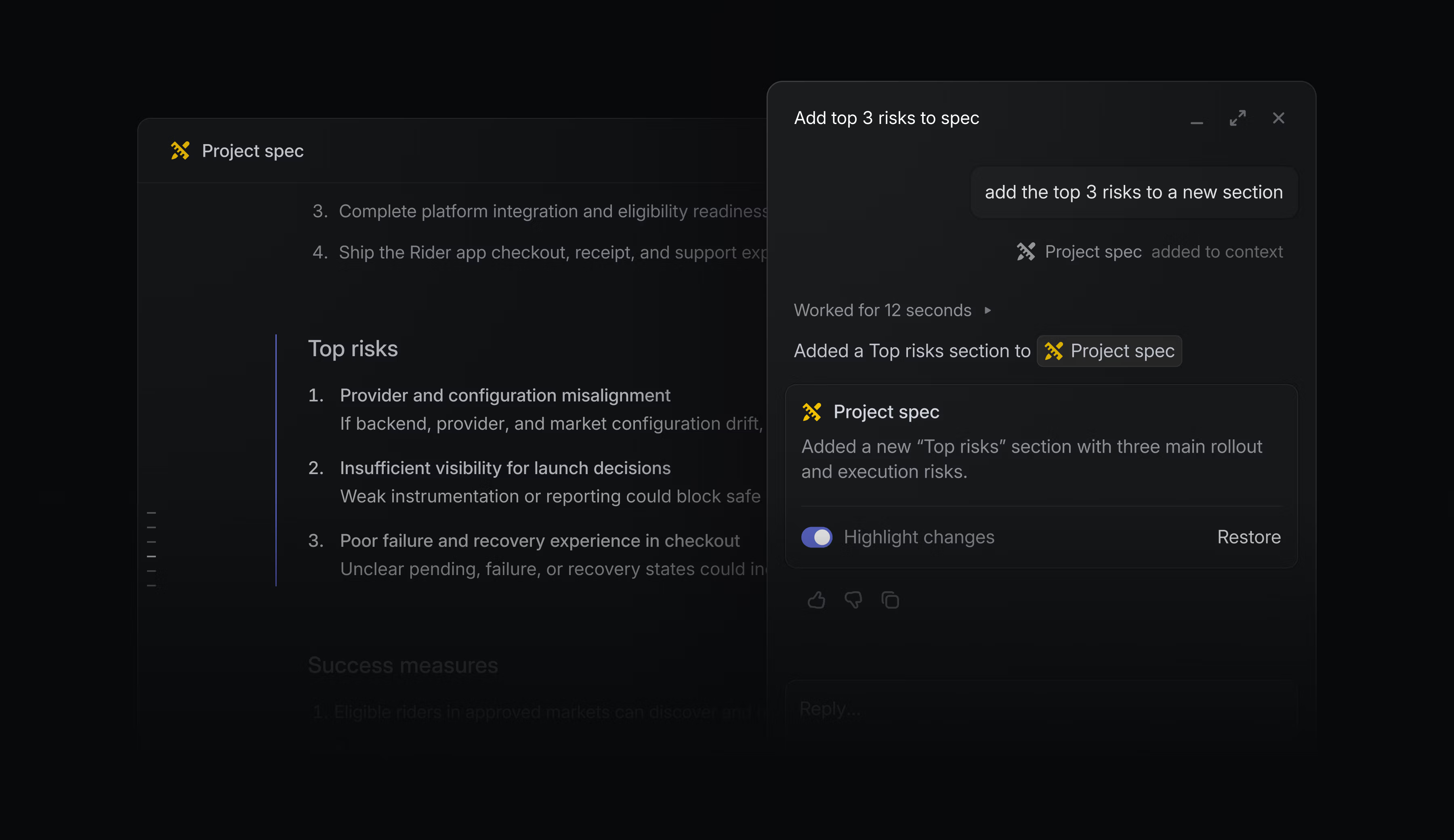
Documents and project descriptions are critical context for your teams and agents.
You can now edit text with Linear Agent, and use Loops to keep docs and project descriptions up-to-date. Author name indicators let you check if text was written by a colleague or added by a loop.
When editing, changes you make through Linear Agent highlight separately so they’re easy to review. If you need to revert to an earlier version, restore to any previous checkpoint from version history.
Show author names or open version history from the ⌘/Ctrl + K menu, or in document display options. Learn more in our documentation.
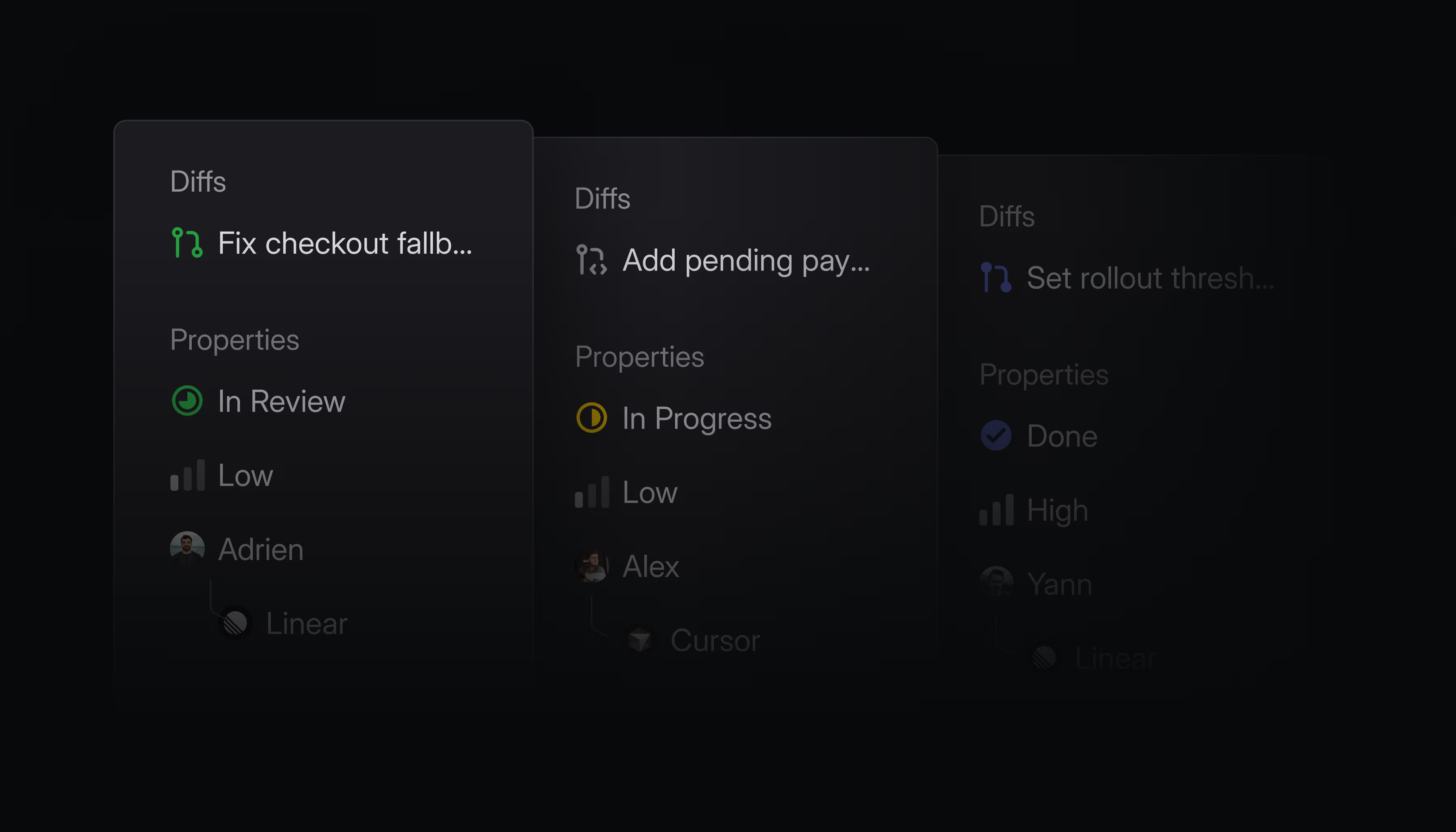
The issue sidebar now closely integrates issue properties with the main content. We’ve pinned Diffs to the top of this panel so you can access the issue’s pull requests from anywhere on the page.
- AsksFixed issues created through Slack Asks ignoring a chosen template’s default status
- CommentsThe resolved comments menu no longer appears when there are no resolved comments
- DiffsSubmit review flyouts now properly close when clicking outside them
- GitHubPrevented revert pull requests from reopening issues linked to another GitHub repository
- GitHubFixed linking GitHub pull requests to issues via pasted URLs.
- InitiativesFixed oversized initiative titles
- IntegrationsFixed a bug where removing a linked GitHub pull request disconnecting GitHub issue sync
- IntegrationsFixed Slack project channel setup retrying after a project was deleted or archived
- SettingsFixed IP restrictions not appearing when searching for “IP” in settings
- SlackFixed truncated issue summaries in Slack unfurls
- ViewsFixed view filters (like Cmd/Ctrl F filtering) resetting when navigating to an item in a split view list
- EditorAdded Backspace navigation from empty issue descriptions and document bodies back to the title
- IssuesImproved issue composer to suggest templates as a quick suggestion, surfaced before other suggestions because they apply a bundle of issue properties
- ProjectsAdded a way to view a project’s issues filtered by a specific milestone from the project overview on iOS
- TriageAdded triage responsibility to the triage screen on iOS, showing who is responsible for incoming issues and letting you manage the action and responsible members
- Diffs“Quick to review” now shows up for slightly larger PRs and also appears for the author of the PR
- Added
bodyDatato GraphQL pull request comments CycleCreateandCycleUpdatenow prevent overlapping schedules and validate neighboring cycles using their dates.
Introducing Loops
Loops are a new way for Linear Agent to take on recurring work for your team.
Describe the job in plain language and then choose whether it should run on a schedule or in response to an event. From there, Loops use context from your workspace and connected tools to decide on the next best action.
For example:
- Review incoming issues, research root causes, and dispatch to coding agents
- Create and coordinate follow-up work based on unstructured notes, like meeting transcripts or incident reports
- Keep launch plans and project specifications up-to-date
- See more ways to use Loops in the docs
Loops run at the team and workspace level, with shared visibility and control. Anyone with access can review their instructions, see how they are configured, and inspect what happened during each run.
Loops are available today on Business and Enterprise plans and use AI credits. To help you get started and understand usage, we’re giving your workspace $20 per seat in promotional credits. These credits are applied automatically to runs, and expire on August 20, 2026.
Read the blog post to learn more.
- AndroidAdded a fallback page for auth redirects so users can reopen the app when browser handoff fails
- AsksFixed Asks created by mentioning the Asks agent in private Slack channels weren’t syncing the originating thread to the issue
- CyclesFixed archived cycles getting stuck behind persisted label and other view filters with no visible way to clear them
- DiffsPull requests with more than 50 commits now loading up to 450 commits
- DocumentsPrivate team document templates now consistently appearing in the template selector
- EditorFixed checklists pasted from Google Docs rendering incorrectly
- EmailPrevented notification emails from being sent to deactivated users
- InboxFixed email intake issues not appearing in the assignee’s inbox when the intake template auto-assigned the issue back to the sender
- IntegrationsFixed GitHub Enterprise Cloud installation webhooks routing to the wrong workspace region before the installation was known to Linear
- IntegrationsFixed GitHub Enterprise Cloud setup showing a generic error when an IP allow list blocked Linear, with clearer guidance on allowing Linear IPs
- NotificationsFixed duplicate Slack notifications when a newly created issue is added to a view with Slack notifications enabled
- ProjectsFixed project pages crashing when a graph tooltip referenced a stale date
- PulseAdded an unsubscribe action for Pulse items shown through team project update subscriptions
- Triage IntelligenceFixed Triage Intelligence no longer requiring destination teams to have workspace-wide scope to be eligible for suggestions
- AgentLinear Agent can now manage inbox notifications
- AsksEmail intake threads can now be resolved and unresolved
- AsksSynced comment threads (Slack and Asks) can now be resolved and unresolved, and a new reply reopens a resolved thread
- CommentsAdded inline issue description comments on iOS, including highlights in the description, tap-to-scroll to the thread, and quoted text above description comments
- DesktopAdded support for Cmd+Z to restore accidentally closed tabs, with timeline-ordered priority and batch restore for bulk close operations
- DiffsAdded the Diffs inbox as a default home view option
- DiffsImproved visibility of auto-merge status in review controls
- DiffsShowed failed checks in merge queue removal events
- DiffsShowed GitHub force-push events in pull request timelines
- InterfaceAdded an Underline links preference under Interface and theme to always underline links in issue descriptions, comments, and documents
- TeamsAdded display options to team member lists for sorting, filtering by member type, and choosing visible columns
- Improved attachment uploads to accept base64 payloads with whitespace or
data:URL prefixes
Initiative properties
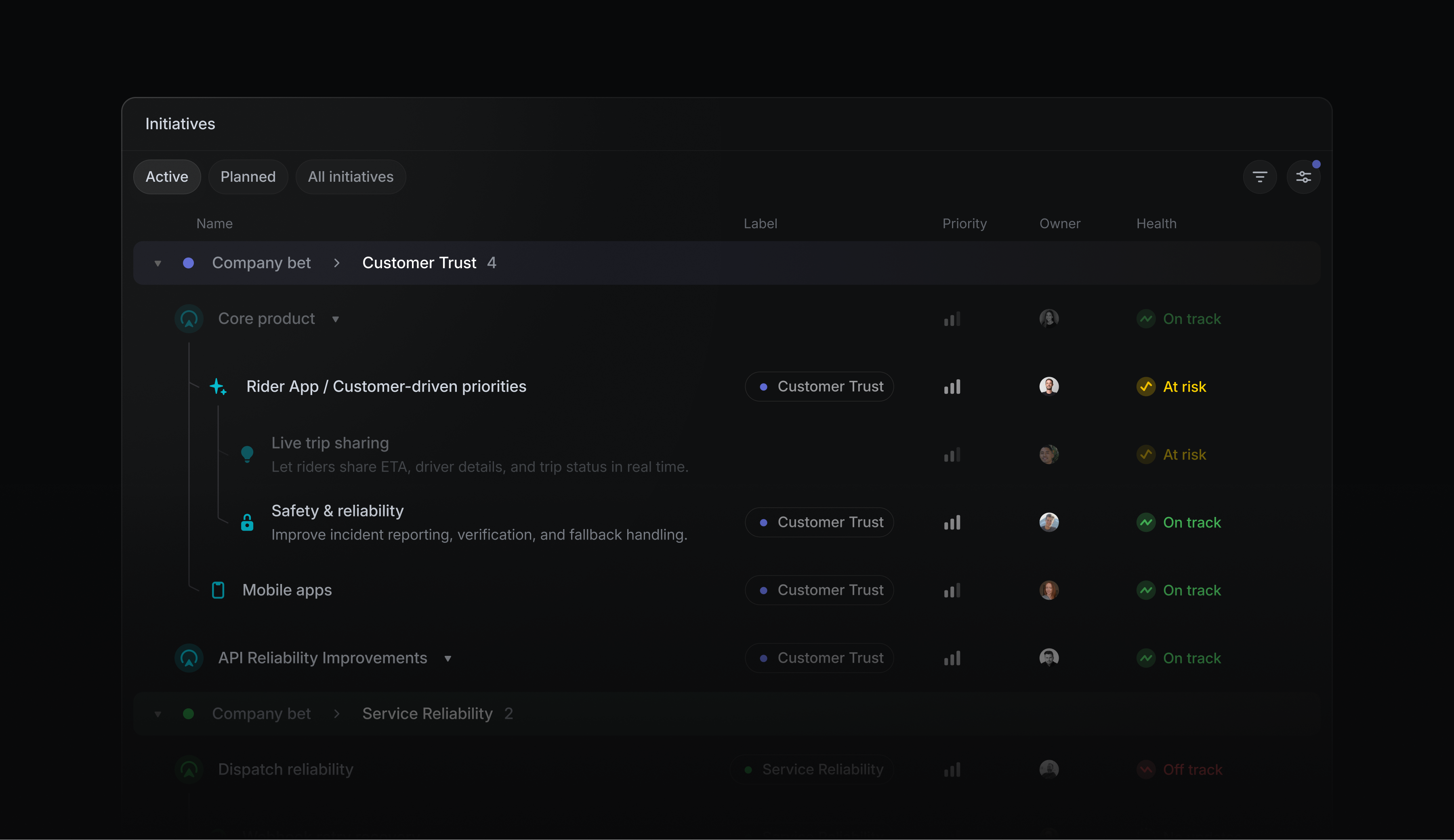
Initiatives define your company’s high-level goals and organize the projects that contribute to them. To help you manage initiatives as your roadmap grows, we’ve added a new set of focused initiative properties:
- Proposed and canceled statuses make it clear when an initiative is under consideration or has been intentionally set aside
- Priority communicates which initiatives are most important
- Labels group initiatives by product line, region, or other meaningful categories
Use these properties to group and filter initiatives on any plan, or build custom initiative views on Enterprise plans. Learn more about initiative properties in the docs.
Centrally manage access to Linear’s MCP server in Claude
Give employees secure access to Linear and other MCP servers in Claude, without requiring them to authenticate with each server individually.
Enterprise-managed Authorization lets Okta administrators manage access and permissions centrally, and users automatically get access to the MCP servers they’re authorized to use when they sign in to Claude.
Enterprise-Managed Authorization is available to Enterprise workspaces using Okta as an identity provider and Claude as an MCP client. Learn more in the docs or in the MCP specification.
You can now share any filtered view by copying its URL from your browser, or by pressing ⌘/Ctrl Shift C on desktop.
Share filtered views to discuss a subset of an existing view with someone else — like an issue view filtered by an assignee, or project or initiative view filtered by a label.
- AgentsFixed issues with editing collapsible sections inside documents and descriptions with the Linear agent
- APIStopped automatically cancelling and restarting active Triage Intelligence runs after issue content changes
- APIFixed fieldless GraphQL input metadata from turning persisted filters into match-all filters
- AsksSlack
/askscommands now pre-fill the modals with the entered text - AutomationsFixed showing agent automation
Show moreprompt buttons only when hovering an automation block - CommentsFixed a transient agent session wrapper appearing after mentioning an agent that only handles comment events
- CyclesFixed renamed cycles showing their local generated cycle number in some client Chrome
- DesktopFixed OAuth application creation form resetting when switching tabs on desktop
- DiffsAdded Linear details comments for manually linked GitHub pull requests when the link is created or changed
- DiffsKept combined code review diffs aligned with side-by-side view when inserted additions are followed by a later paired helper extraction
- DiffsShow pull request status icons for coding session inbox notifications tied to PRs
- DiffsFixed review notifications to now open the diff at the relevant comment instead of the guide
- DiffsFixed Team reviews settings appearing when Diffs were disabled
- DiffsFixed poor contrast of JSDoc comments in the GitHub Light syntax theme
- DiffsFixed scroll position jumping when expanding collapsed code sections in diff view
- DiffsFixed commit navigation controls shifting when the changed file count changes between selected commits
- DiffsComment filters on the PR Diffs tab no longer hide comments in the Guide
- EditorFixed emoji rendering in italicized text so emojis remain upright
- EditorImproved autolink for a broader list of TLDs when pasting URLs in the editor
- EmailFixed email intake settings occasionally displaying an incomplete email address
- InitiativesFixed initiative list with sub-initiatives correctly restoring scroll position on navigation
- InitiativesFixed transparency issues with the icon picker when editing initiatives inline in the list
- IntegrationsReverted a GitHub sync change that stopped updates from Linear to GitHub once an issue is synced via the
one-waysync - IntegrationsAdded a warning to Slack issue dialogs when selected labels include multiple labels from the same label group
- IntegrationsFixed Google Calendar out-of-office status labels showing an absence as starting today when it starts tomorrow in the user’s timezone
- IntegrationsFixed GitHub issue sync sending Linear label updates back to repositories configured for one-way GitHub-to-Linear sync
- IntegrationsFixed Linear user mentions in Slack unfurls notifying mentioned users
- IntegrationsFixed Slack synced comment import retries when Slack returns missing scopes while fetching message replies
- Issue ActivityFixed issue activity history no longer briefly reordering or regrouping while loading when lots of labels are involved
- Issue templatesFixed blank optional-only form template submissions from creating empty issues
- IssuesFixed issue sidebar hover styles not updating after switching between dark and light mode
- IssuesFixed copied issues including sub-issues after the Include sub-issues option was disabled
- IssuesFixed SLA workflow triggers failing when a workflow condition did not include an issue filter
- MobilePrevented synced email threads from being resolved from Android
- Project ViewsFixed a problem where hidden groups could not be restored in timeline views
- ProjectsFixed completed projects appearing in project dependency blocker counts
- ProjectsFixed newly created projects now receiving varied default icon colors, matching initiatives
- ProjectsFixed the project update editor border disappearing after Agent highlight interactions
- ReleasesFixed started release stage rows appearing taller than other rows in release pipeline settings
- SettingsFixed existing application images now showing when editing an OAuth application
- SettingsFixed settings search input box now respecting custom sidebar theme colors
- SettingsFixed customer status and tier row dividers appearing brighter than the header divider in settings
- SettingsFixed workspace security settings copy incorrectly referencing recurring issues for workspace template management
- SidebarProperly aligned controls in the sidebar into one consistent column and fixed their focus rings
- SlackStopped retrying permanent Slack webhook errors for disabled app message tabs and invalid block payloads
- TeamsFixed duplicate favorite action in action menu on team views
- TriageFixed Triage rules sometimes showing duplicate or missing rows immediately after saving
- TriageFixed the issue preview closing when a new issue entered a label-filtered Triage queue
- ViewsFixed some server-backed views not loading correctly with some complex filter conditions
- ProjectsProject and initiative overview latest updates no longer inherit the previous latest update’s open state
- DiffsFixed commit titles of specific lengths from overflowing the commit selector dropdown
- InitiativesInitiative target dates now use the same completed date rendering semantics as project target dates
- InitiativesShow the notifications subscribe control on initiative pages
- EstimatesRestored the selected issue’s estimate total in the bulk action toolbar
- EditorFixed dragging URL-backed Linear content into editors that was inserting duplicated mentions
- PulseFixed Pulse summary item navigation inside the inbox and added a breadcrumb back to the originating summary
- DocumentsFixed restoring deleted documents whose project parent is archived
- Pull requestsCmd-clicking linked pull requests now opens them in a new tab
- DiffsFixed bug where some code in Code Review diffs could not be copied to the clipboard
- AndroidAdded support for toggling todo checkboxes directly in issue descriptions and comments
- DiffsAdded syntax highlighting for
.gjsand.gtsfiles in Diffs - DiffsAdded settings to control whether GitHub team review requests appear in Reviews and count as To Do
- DiffsCollapsed generated protobuf Go files in pull request diffs by default
- DiffsChanged PR comment copy menu label to refer to threads when copying prompts for comment threads
- InboxAdded ability to filter inbox notifications by related review status
- IssuesRenamed canonical issue duplicate relation labels from “Duplicated by” to “Duplicates”
- SearchUpdated search tabs to show the search term with a Search prefix and a search-results icon
- TeamsImproved the spacing between team home columns at medium-width resolutions
- SettingsClarified the keyboard preference for submitting comments and agent chat messages
- InsightsImproved performance of issue and insights queries that filter by initiative
- GitHubAdded
Linear issueto the list ofmagic wordslinking pull requests to issues
- Added read-only MCP tools for listing and retrieving Linear Agent skills
- Added support for managing releases, release notes, and release issue associations through the MCP server
- Added source URL support to the
save_customer_needtool
- Added an external-user actor variant to the webhook actor union
- Included the top-level
urlfield in data-change webhook payloads for remove actions when an entity URL is available - Fixed entity webhooks for external-user actions so their top-level actor is populated
- Added the ] shortcut to show or hide the Agent sidebar from Diffs when an Agent session is available
- Fixed Shift Cmd/Ctrl ArrowDown not opening sub-issues in board view