Coding sessions in Linear
Earlier this year, we launched Linear Agent, giving teams a new way to plan and coordinate their issues and projects. Since then, we’ve added Code Intelligence to extend that understanding to the codebase, and MCP support to bring all of your context together.
Today we’re closing the loop: Linear Agent can now write code using Claude Code and Codex. You can triage, plan, review, and ship—all in Linear.
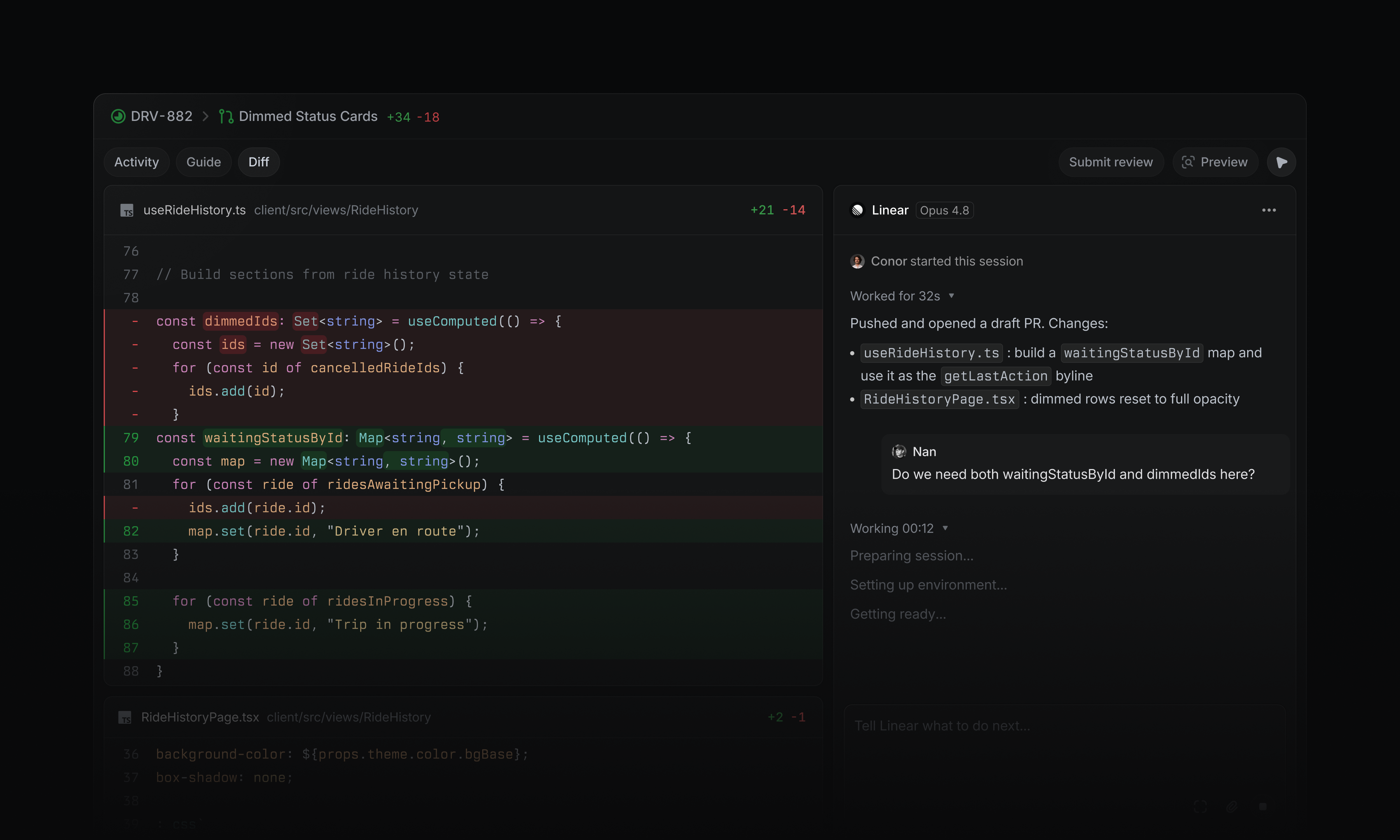
Start a coding session by assigning an issue to Linear, or ask it to make a change in a chat, comment, or Slack thread. Each session is grounded in your workspace context, pulling in issue details, history, customer requests, discussions, and related work.
A coding agent your team will love
Coding sessions run in the cloud, so you can prototype ideas and make changes without setting up a local development environment.
When the change is ready, Linear returns a new diff for review. Share preview links, bring teammates into the discussion, and address feedback with further iterations in the same thread.
Automate the first pass
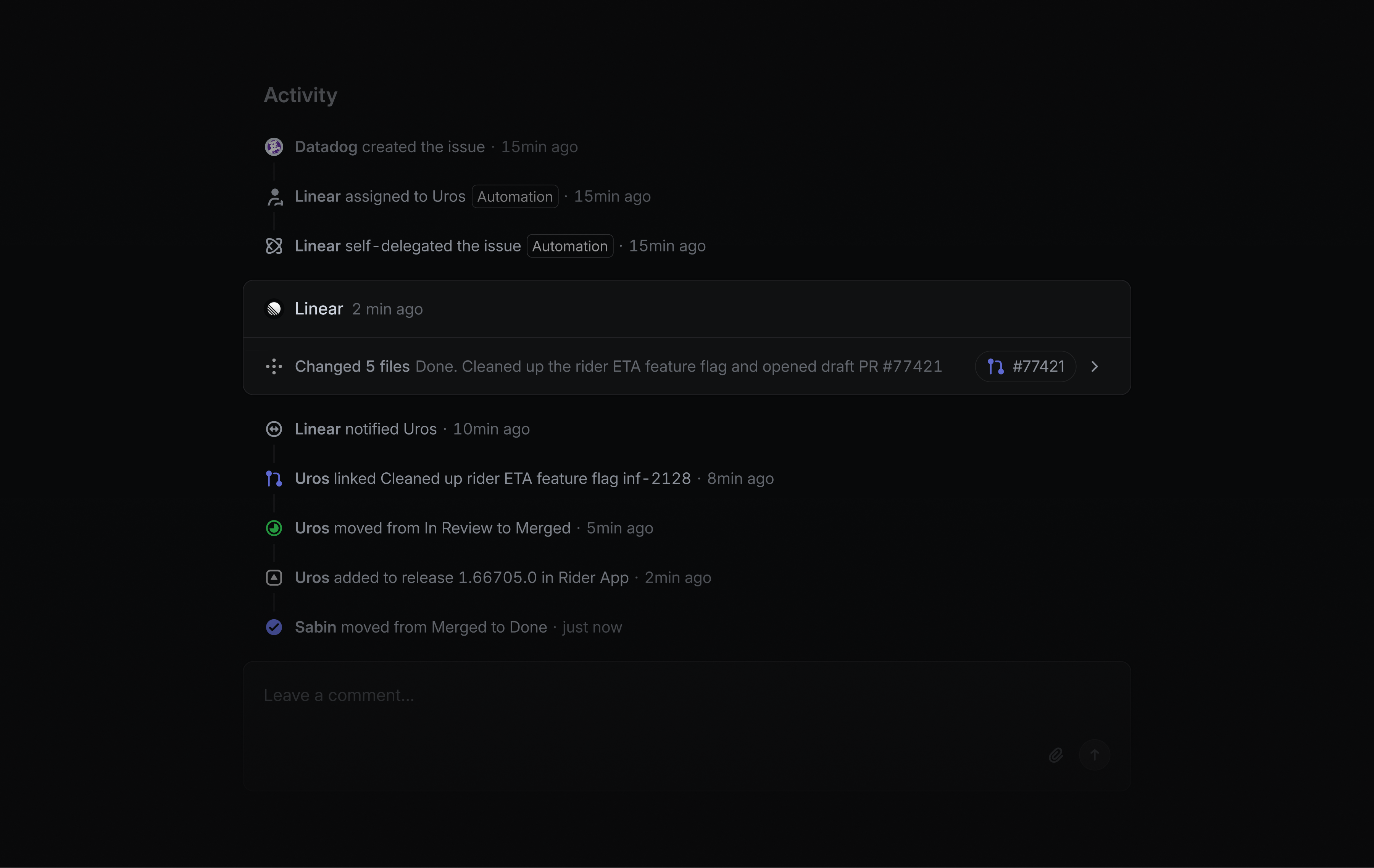
When a new issue is reported, Linear Agent can investigate and attempt a fix before it reaches an engineer, reducing the load on your team.
It follows your team’s guidance, gathers evidence from tools like Sentry or Datadog through MCP, and inspects the codebase to trace the root cause before producing a fix.
Linear uses this workflow internally to resolve roughly 30% of incoming bug reports, mostly on the first pass.
You can set up your own agent automation in your team’s Triage settings.
Availability and pricing
Coding sessions are available on Basic, Business, and Enterprise plans. They require a GitHub connection with code access and use AI credits to run. Workspace admins can enable coding sessions in Settings and manage access, usage, and credits from the usage dashboard. Learn more in the docs.
- AgentsFilled in the thumbs down button after submitting AI feedback
- AgentsFixed a missing space between the integrations link and surrounding text on the team agents settings page
- AgentsVertically centered the label and preview text in the agent session card’s status row
- AgentsFixed left padding of the agent session card header to match other activity cards
- ArchiveFixed restoring a trashed issue or document failing in rare cases where the document’s trashed flag was stored as
false - AsksAllowed Slack workflows and external users using the Asks Agent to access private teams’ channel-configured templates
- CustomersFixed excessive row spacing and the limited customer list on the unfiltered customers page
- CustomersFixed the customer merge preview showing annual revenue under the monthly revenue label
- CustomersFixed a bug where linking a Slack channel to a customer failed for workspaces with multiple Slack connections but a single Asks connection
- DiffsOpening a
linear.reviewlink in a workspace without Diffs enabled now routes to enable-reviews instead of bouncing back to GitHub - DiffsFixed showing GitHub legacy commit statuses (e.g. external CI like RWX or Jenkins) in PR checks
- DiffsFixed “Update branch → with rebase” creating a merge commit instead of rebasing
- DiffsFixed the file list sidebar not scrolling when the file tree was taller than the viewport
- Display optionsFixed the display options menu being slow to open on views grouped into a large number of items
- EditorFixed customer and customer request mentions not loading their details in the iOS editor
- EditorPasting
linear.app/review/<owner>/<repo>/pull/<id>now properly embeds as a PR mention - EditorFixed the tooltip for plain links covering link controls
- GitHubFixed Linear issues with comma-containing label names failing to sync to GitHub
- InitiativesFixed Initiative projects table columns occasionally overlapping or taking up too much width
- IntegrationsFixed an importer freeze when mapping a large number of users
- IssuesFixed a line break appearing between an issue’s status icon and its identifier in undo/redo toasts
- LabelsArchived labels no longer appear in the form-template label group picker
- LinksFixed a crash when a link embed with a missing or invalid URL failed to load a preview
- MobileRelease, Release Note, and Release Pipeline mentions now display properly on mobile
- NotificationsFixed agent completion notifications not being delivered to the user who delegated the work
- ProjectsProject issue list deep links now redirect to the project overview instead of the filtered issue view
- Project ViewsFixed saved project views unexpectedly showing empty groups when grouping and filtering projects
- PulseFixed daily Pulse summaries being skipped when a single feed update had a malformed body
- SCIMFixed SCIM role group pushes not repairing a stale role when the user was already tracked in the role’s membership
- SettingsAI settings dependent on the Linear Agent now show “Disabled” when the Linear Agent is turned off
- SlackSharing a project comment link in Slack now unfurls the comment instead of the project
- SLAsFixed missing SLAs for issues created from Slack asks
- UpdatesFixed inconsistent icon spacing in the project/initiative update health control
- AsksImproved longer, cleaner fallback issue titles when creating Asks from Slack without an AI-generated title
- DiffsThe “Copy pull request number” action now copies just the number, without the leading
# - DiffsAdded a file action to open the full file in GitHub from the review diff
- DiffsGuided reviews now jump directly to a selected file instead of scrolling slowly through every file in between
- DocumentsAdded “New document” and “New document from template” to the right click menu on the create issue button
- Team DocumentsAdded cycle documents to the team documents tab, including support for grouping documents by cycle
- TriageOn Android, choosing a status that requires a priority to leave triage now opens the priority picker automatically instead of hiding those statuses
- EditorChanged the strikethrough shortcut to Cmd/Ctrl Shift X
list_commentsnow returns comments on archived issues- Documents can now be listed and created under a team