- Integrations
- Supernormal
Go from discussion to Linear issues in seconds



Overview
Supernormal connects directly with Linear so you can turn meeting discussions into clear, actionable tasks. The integration makes it easy to assign owners, choose the right team, and keep work moving without switching tools.
How it works
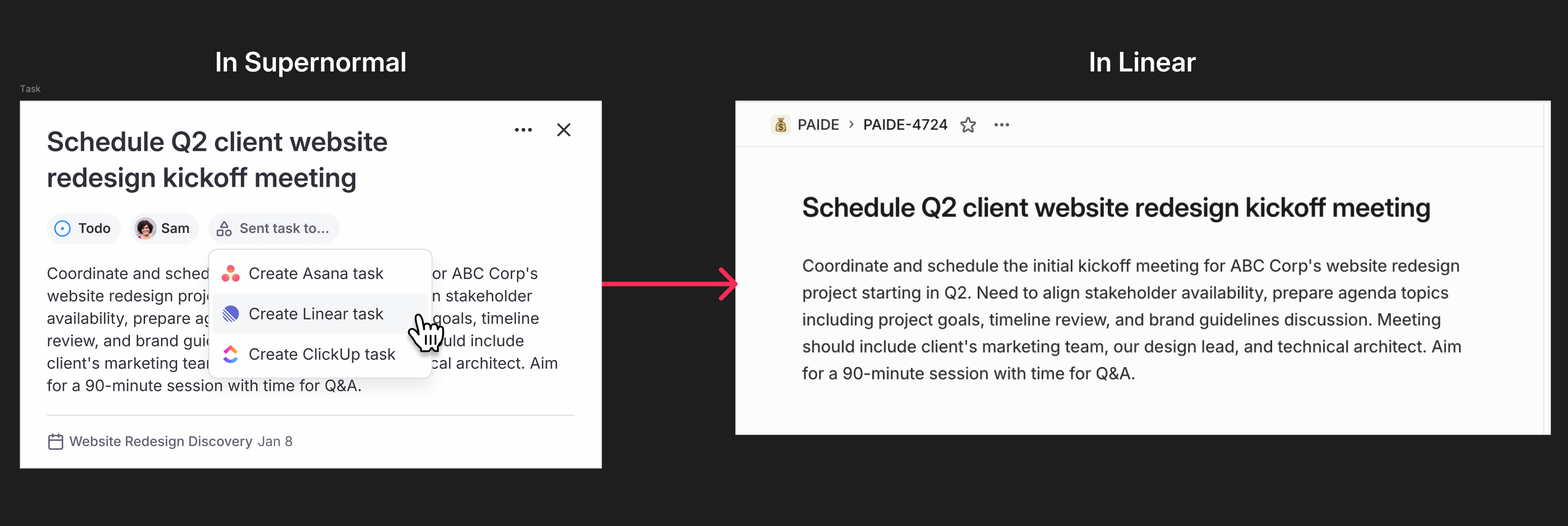
Once you enable the Linear integration in your Supernormal account, you can create Linear tasks straight from your meeting notes. Open a meeting note, scroll to your action items, and select the Linear option. You can choose the assignee and the team the task belongs to before sending it to Linear.
After the task is created, it appears in your Linear workspace with a direct link back to the original Supernormal note. This keeps context close by and helps teams move from discussion to execution without losing information.
The integration is available to all Pro, Business, and Enterprise customers and can be managed anytime from the Integrations tab in your Supernormal settings.
Configure
To set up the Linear integration, open your Supernormal account settings and go to the Integrations tab. Turn on the Linear integration toggle, then sign in to your Linear account and choose the workspace you want to connect.
Once your accounts are linked, you can send tasks to Linear directly from your meeting notes. No special permissions are required beyond access to the Linear workspace you select.