# Customer Requests
Bring the voice of the customer into product development.
## Overview
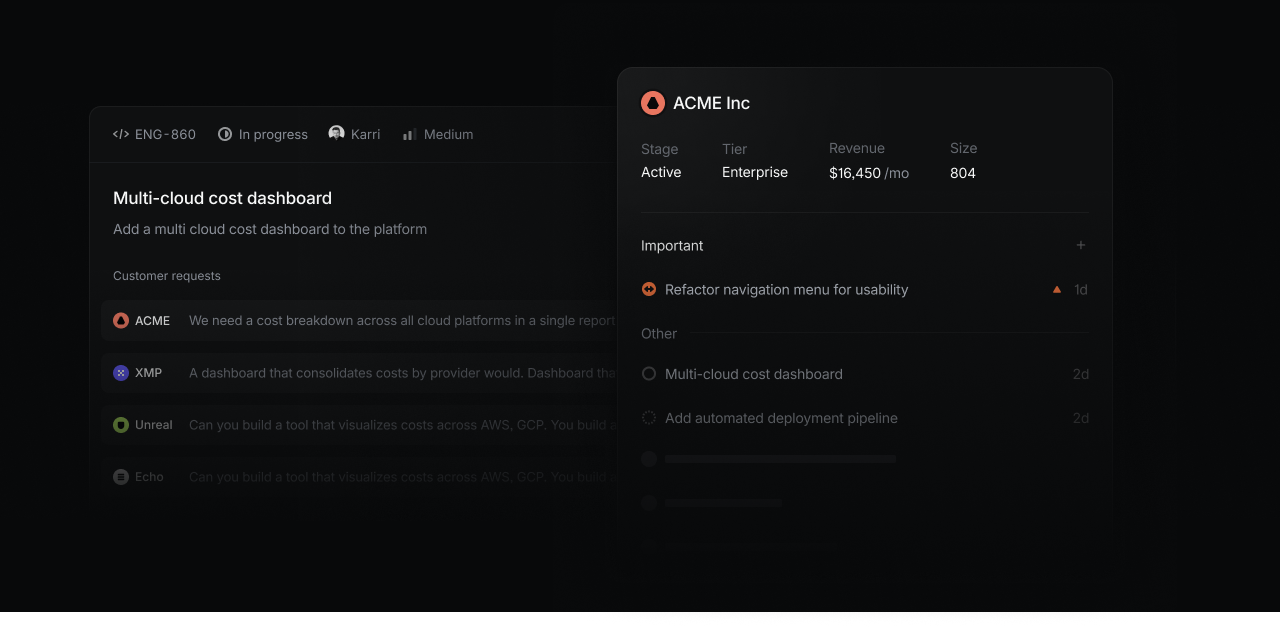
Customer Requests allow you to add detailed user feedback and customer attributes to Linear to better align product work with real user needs:
* Link customer requests to specific issues or projects in Linear to make feedback accessible to your product team
* See customer pages displaying all requests made by specific customers along with attributes like revenue, size, and tier
* View and filter issues or projects by customer name, count, status, tier revenue, and size to identify high impact product work
What this video over to see how Customer Requests works:

## Configure
Admins can enable Customer Requests in [Workspace Settings > Customer requests](https://linear.app/settings/customers). Once enabled, anyone in your workspace can view customer pages, create and update customers, and add customer requests to issues and projects in Linear or from a supported integration.
When an issue is created from integrations with [Intercom](https://linear.app/docs/intercom), [Zendesk](https://linear.app/docs/zendesk), [Front](https://linear.app/docs/front), or [Asks](https://linear.app/docs/linear-asks), it will automatically add a request pointing back to the source. Requests can also be added manually and are viewable in their associated issue and the customer's page.
From settings, add further customizations. Choose a team to receive new issues created from a request by default (we recommend selecting a team [exclusively used to track feedback](https://linear.app/now/cx-in-linear)). You can also customize revenue units and tiers for different plans or products you offer. Revenue, Tier and Size fields will be automatically populated if you use the Intercom integration, or can be filled when creating customers manually.
## Customers
A Customer in Linear represents an organization using your product. Customers have a unique domain, name, logo, and attributes which can be viewed on their page.
### Customer pages
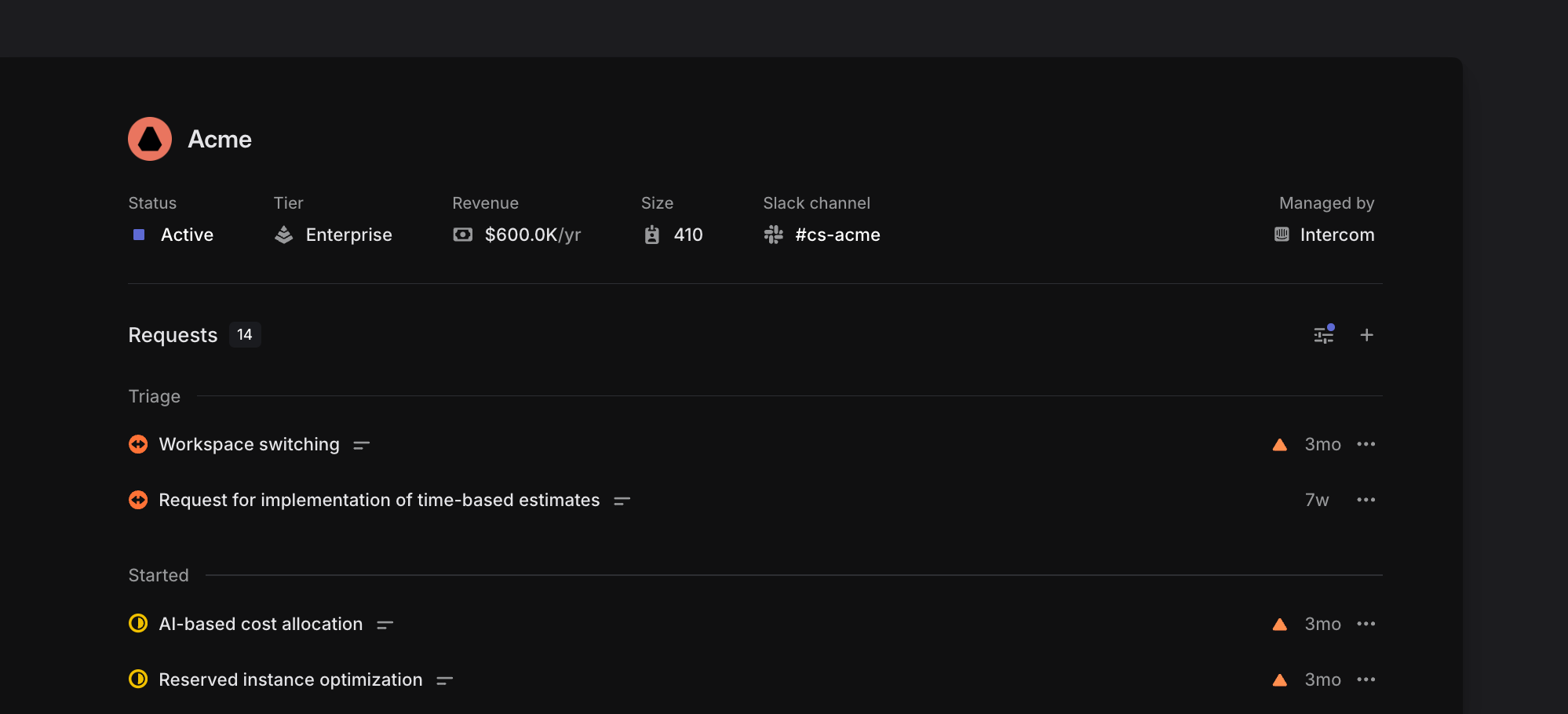
Customer pages show all issues and projects with a request associated with that customer. You can group and order this list of issues to see what issues have been marked as important or what issues are in progress. Click on individual issues to open and view their request on that issue in full detail.
For customers created through Intercom or manually, you'll also see attributes like the customer's revenue, status, tier, and size on the customer page. Individual customer pages can be favorited so that they're easy to access from the sidebar.
### Open Customer pages
* Use `O` then `Q`, then search for the customer's name
* Open the full customer list with `G` then `Q`, then search to narrow down results
* Search for the customer in the `Cmd`/`Ctrl` + `K` menu
### Create Customers
#### From integrations
In most cases, customers will be created automatically through an integration at the same time their first request is created. Linear will use the customer's email domain to correctly map the request.
#### Manually
If your organization does not use these integrations, you can create Customers manually instead. To do so, open the command menu with `CMD + K`, then type `Create new customer`, then `Return`
## Customer requests
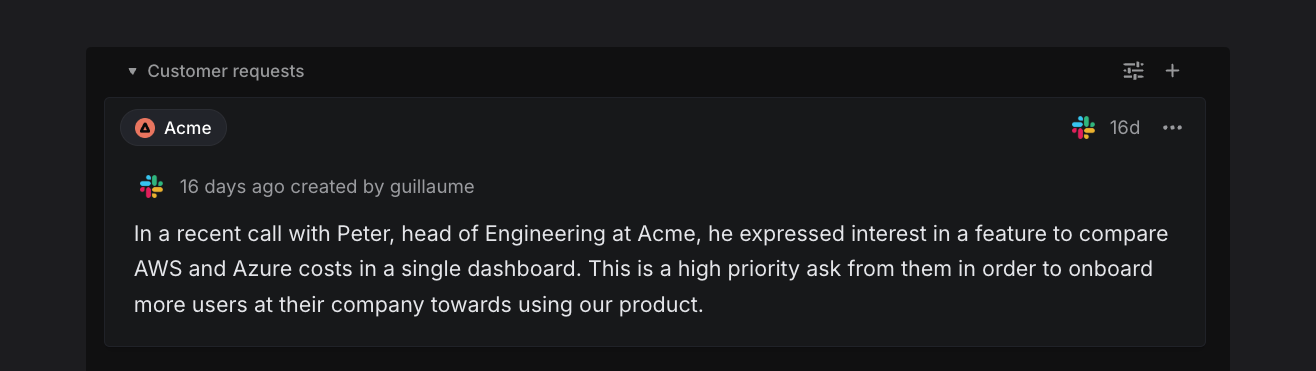
Customer requests link user feedback to specific issues in Linear.
### Add requests to issues or projects
A customer request is created automatically whenever you create or link to an issue or project from a supported integration. The request will appear both on the issue/project itself as well as on the associated customer's page.
#### From integrations
When made from an integration, the customer request will quote the original message from the user. This request can be edited in Linear to add images, videos, or extra context. Requests also include a link to the source (e.g. Intercom conversation), name of the user associated with the request, and timestamp.
#### Manually
Requests can be created manually in Linear using the `+` icon underneath an issue description, from the button on a customer page, or by using the keyboard shortcut `Ctrl` `R` (macOS)/ `Ctrl` `Alt` `R` (Windows). This is useful when a request comes in through a channel not necessarily associated with an integration, like if you have Linear open during an in-person meeting.
From the project page, you can add customer requests using CTRL+R, or the + Customer Request button. Once your first Customer Request is added to a project, a dedicated tab for Customers will appear next to the Overview tab.
Remember to configure a default team in [settings](https://linear.app/settings/customers) for customer requests, so that issues are created in that team when requests are created from individual customer pages.
### Integrations
The following integrations can create issues with customer requests:
#### Intercom
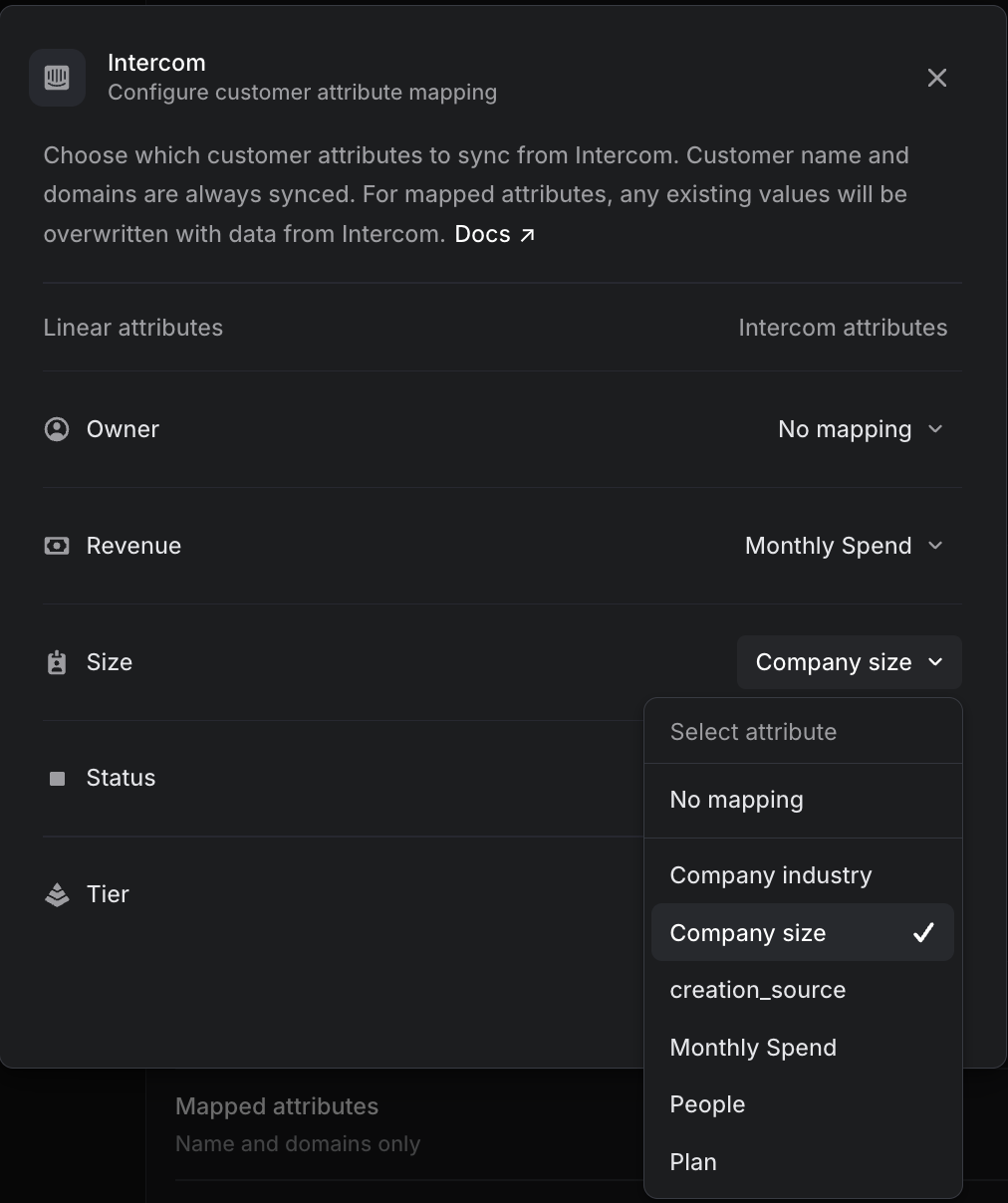
Requests are created when you create new issues or link to an existing issue or project from the Intercom integration. Customer attributes such as size and revenue can be synced with and managed from Intercom.
#### Zendesk & Front
Requests are created when you create issues or link to an existing issue or project from Zendesk or Front conversations.
#### Salesforce
Requests are created when creating an issue from a case, or linking a case to an existing issue.
#### Asks
Whenever an Ask is created, a customer request will be associated with the issue and link the specific feedback and customer to the Ask. The customer association for Asks follows the email of the person who sent the first message in the thread, not the person who created the Ask.
If you have a Linear account and are creating an Ask in Slack, you can also select a customer manually. We do not expose your customer list to other users in your Slack workspace without Linear accounts, but if they create an Ask from the overflow menu on an existing message the customer association will be automatic.
To ensure proper customer attribution despite varying Slack privacy settings in shared channels, we recommend directly linking any shared Slack channels to the customer page (select the three-dot menu, then _link to Slack channel.)_ This way, all Asks created in that channel will automatically be associated with the customer.
#### Slack
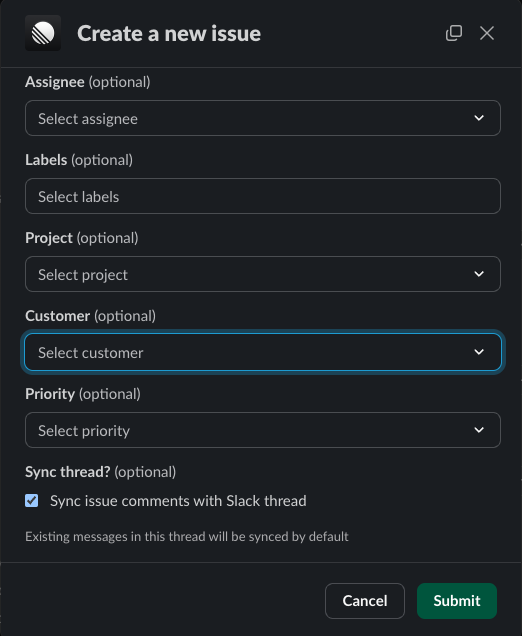
When creating an issue from the Slack integration, optionally select "Customer" to associate a customer request with the issue you are creating. This value will prefill if Linear is able to determine the domain of the user who sent the message.
To default a customer being selected in a Slack channel, open the customer page in Linear (`O then Q`) and from the … menu choose the "Link to Slack channel" option.
#### API
Requests and Customers can be created with [customerNeedCreate](https://studio.apollographql.com/public/Linear-API/variant/current/schema/reference/objects/Mutation?query=customer#customerNeedCreate) and [customerCreate](https://studio.apollographql.com/public/Linear-API/variant/current/schema/reference/objects/Mutation?query=customer#customerCreate) respectively in our GraphQL API.
However, using our API to import customer data from a warehouse—commonly done through an rETL pipeline—can be challenging, as GraphQL is not optimized for bulk data transfers, and Linear does not currently offer a REST API. We plan to offer better support for importing customers to Linear in the future.
### Mark as important
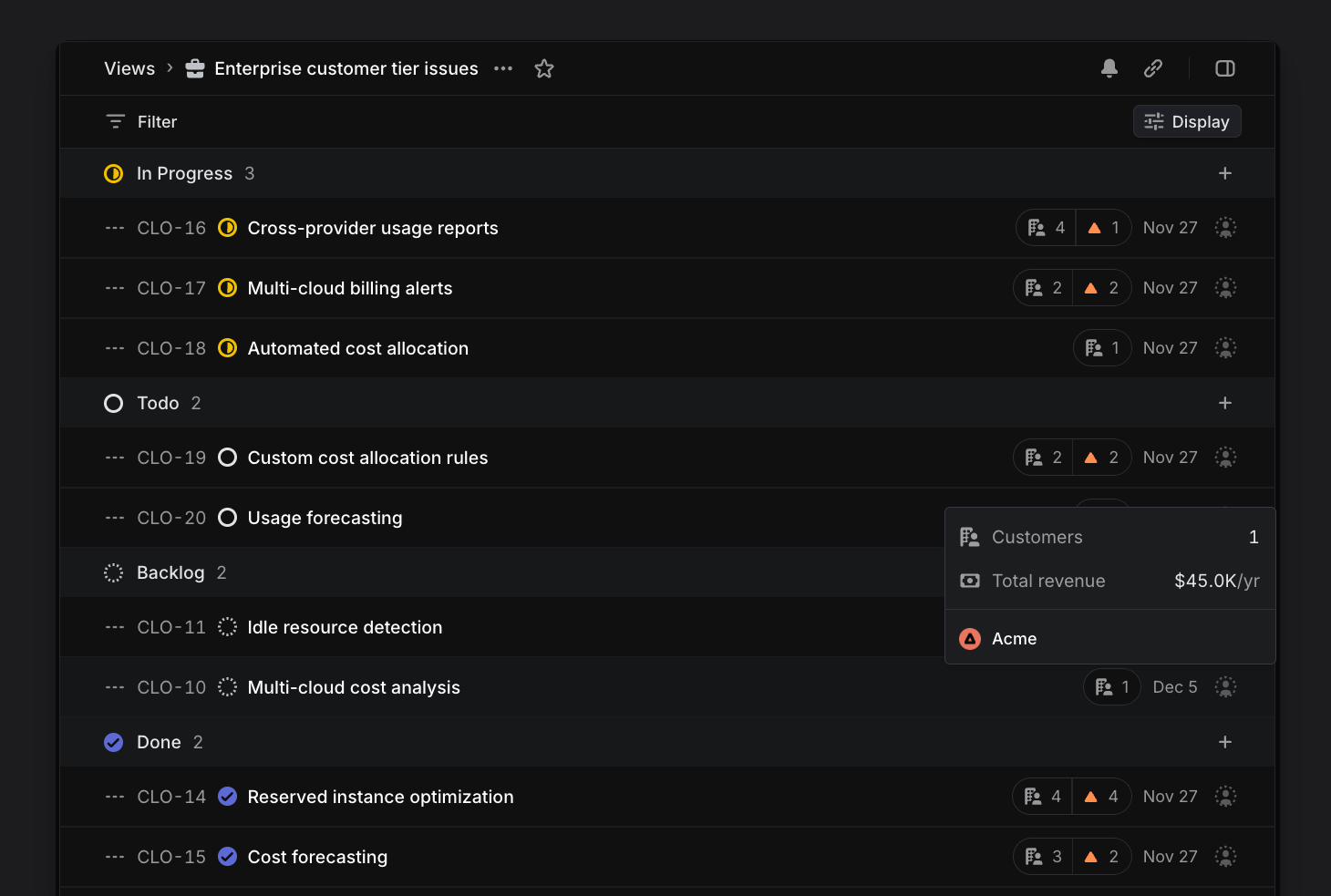
Requests can be flagged as important to specific customers. For instance, an issue or project may have requests from five different customers but be marked as important by only one of those customers. This binary indicator, shown as a triangle, lets customer-facing teams separate requests that represent a critical need from those expressing a nice-to-have feature.
### Synced Attributes
From _Settings > Customer Requests > Customer attributes data source,_ you can choose a data source for Linear customer attributes such as Intercom, Zendesk or Front and create mappings between source tool attributes and attributes on Linear Customers. You can also choose _None_ as a data source to allow more control via the API or directly in the interface. Once an external source is configured the company name and domain are automatically synced.
_Owner, Revenue, Size, Status_ & _Tier_ can be remapped to pull from data in your source tool. These values are regularly kept up to date as they will be [synced with your source](https://linear.app/docs/customer-requests#collapsible-7589124828b2).
You can also choose to enable manual edits for any attributes that are unmapped. Attributes will always be editable via the Linear API regardless of this UI-specific setting.
## Build customer views
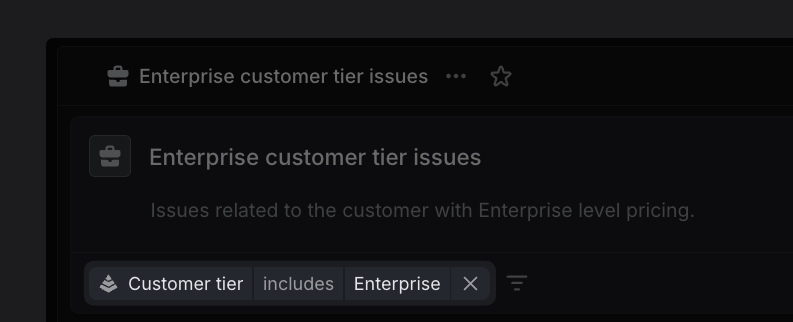
All customer data brought into Linear can be used to create [custom views](https://linear.app/docs/custom-views) for both issues and projects to surface the impact of your work on your customers. For example, create a view of issues with requests from Enterprise customers ("Tier" property from Intercom), where each issue has at least 20 requests. Ordering this view by customer count surfaces the most highly requested issues to the top. Triangle icons indicating requests marked important surface urgent needs. Consider consulting this view when planning upcoming cycles to ensure what you ship aligns with the needs of the users.
### Notifications
You'll receive Inbox notifications automatically when new requests are added to issues you subscribe to so you're always in the loop. Optionally, configure additional notification styles for new requests [here](https://linear.app/settings/account/notifications).
[Subscribing to custom views](https://linear.app/docs/custom-views#view-subscriptions) is the best option for more targeted alerts. For example, you might wish to stay aware of issues commonly raised by customers who churn. To track that, create a custom view defined by Customer status includes _Churned_, and ordering the issues by customer revenue. Click the bell icon to be alerted when a new issue is added to the view, or configure notifications to a Slack channel for greater visibility.
You can also open a specific customer page (`O ,_then_, Q`) and under the bell icon subscribe to get notified when a request is added, marked important, completed or cancelled.
### Export Customer Requests
Should you need to export your customer requests from a particular customer, issue, or project, an option exists in the `Cmd`/`Ctrl` + `K` menu. Search the command menu and select _Export customer requests as CSV_ to take that action.
## FAQ
Which plans support Customer Requests?
Customer Requests is available on all currently offered plans: (Free, Basic, Business, and Enterprise.) You'll only be able to create requests from integrations available on your plan.
Create requests | Free | Business | Enterprise
--- | --- | --- | ---
Manually | ✔ | ✔ | ✔
From Slack | ✔ | ✔ | ✔
From Asks | | ✔ | ✔
From Intercom, Zendesk, and Front | | ✔ | ✔
From Salesforce Service Cloud | | | Coming soon
Can I manage customer requests through the API?
The following actions are available through our GraphQL [API](https://studio.apollographql.com/public/Linear-API/variant/current/schema/reference?query=customers):
* Create/Edit/Delete customers
* Create/Edit/Delete customer request
* Create/Edit/Delete customer tiers
* Create/Edit/Delete customer statuses
* Query and filter customers
* Query and filter requests by issue/projects/priority/customer
Can I merge duplicate customers?
Linear will prevent duplicate customers from being created in most cases. If you notice a duplicate instance, go to the customer page that you want to merge and select the _Merge with_ option from the dropdown menu.
How do I block domains from creating customers?
In [Settings > Customer requests](https://linear.app/settings/customers), exclude specific email addresses or domains to prevent them from creating a customer.
For example, add a domain to _Excluded domains and emails_ to prevent your own company from creating a customer. Internally, we've excluded `linear.app` here to prevent `Linear` from displaying as a customer when we create issues via integrations.
How do I avoid domains being associated with a customer?
You can prevent specific domains from ever being associated with a customer from [Settings > Customer requests](https://linear.app/settings/customers) and adding a domain or email under Excluded domains and emails.
Common providers like Gmail, Outlook etc. are automatically excluded. The full list of generic domains from common providers can be viewed here:
List of domains
• [10mail.org](http://10mail.org/)
• [10mail.xyz](http://10mail.xyz/)
• [163.com](http://163.com/)
• [alice.it](http://alice.it/)
• [aol.com](http://aol.com/)
• [appleid.com](http://appleid.com/)
• [att.net](http://att.net/)
• [bigpond.com](http://bigpond.com/)
• [comcast.net](http://comcast.net/)
• [cox.net](http://cox.net/)
• [dropmail.me](http://dropmail.me/)
• [duck.com](http://duck.com/)
• [emlhub.com](http://emlhub.com/)
• [emlpro.com](http://emlpro.com/)
• [emltmp.com](http://emltmp.com/)
• [facebook.com](http://facebook.com/)
• [fastmail.com](http://fastmail.com/)
• [flymail.tk](http://flymail.tk/)
• [free.fr](http://free.fr/)
• [freeml.net](http://freeml.net/)
• [gmail.com](http://gmail.com/)
• [gmx.de](http://gmx.de/)
• [googlemail.com](http://googlemail.com/)
• [hey.com](http://hey.com/)
• [hotmail.co.uk](http://hotmail.co.uk/)
• [hotmail.com](http://hotmail.com/)
• [hotmail.fr](http://hotmail.fr/)
• [hotmail.it](http://hotmail.it/)
• [icloud.com](http://icloud.com/)
• [ig.com.br](http://ig.com.br/)
• [laposte.net](http://laposte.net/)
• laste.ml
• [libero.it](http://libero.it/)
• [live.co.uk](http://live.co.uk/)
• [live.com](http://live.com/)
• [live.fr](http://live.fr/)
• [live.nl](http://live.nl/)
• [mac.com](http://mac.com/)
• [mail.ru](http://mail.ru/)
• [me.com](http://me.com/)
• [minimail.gq](http://minimail.gq/)
• [msn.com](http://msn.com/)
• [neut.fr](http://neut.fr/)
• [outlook.com](http://outlook.com/)
• [outlook.de](http://outlook.de/)
• [pm.me](http://pm.me/)
• [privaterelay.appleid.com](http://privaterelay.appleid.com/)
• [proton.me](http://proton.me/)
• [protonmail.com](http://protonmail.com/)
• [qq.com](http://qq.com/)
• [rocketmail.com](http://rocketmail.com/)
• [sbcglobal.net](http://sbcglobal.net/)
• [sfr.fr](http://sfr.fr/)
• [simplelogin.com](http://simplelogin.com/)
• spymail.one
• [terra.com.br](http://terra.com.br/)
• [verizon.net](http://verizon.net/)
• [web.de](http://web.de/)
• [yahoo.com](http://yahoo.com/)
• [yahoo.de](http://yahoo.de/)
• [yahoo.es](http://yahoo.es/)
• [yahoo.it](http://yahoo.it/)
• [yandex.ru](http://yandex.ru/)
• [ymail.com](http://ymail.com/)
• [yomail.info](http://yomail.info/)
• [yopmail.com](http://yopmail.com/)
How does visibility of Customer Requests work across roles?
Admins and Members will be able to see Customers Requests in Linear and in Slack in the dropdown menus on Asks and our Slack integration.
Guests see nothing relating to Customer Requests, including views that use Customer-related filters.
Users in your Slack workspace without Linear accounts will not see your customer list when using Asks, though we'll still match the Ask to a customer where appropriate based on the user domain of the original message's sender.
Can I stop Intercom, Zendesk, Front from creating new customers or customer requests?
In the integration settings for your support tool, you can toggle the setting off.

How often is data synced from an external source?
Intercom is synced in real time and all other integration sources are synced every 12 hours.